Latest evidence checked October 9, 2026

Choose software for the job

App Builders: Best No-Code AI Software Compared (2026)

Bubble, Lovable, Base44 and Replit build apps in different ways. Your choice depends on what the app must do, how you want to make changes and whether you need the source code.

4 Products compared
5 Published comparisons
141 Capabilities in the record
Latest evidence checkOriginal comparisons through September 7, 2026

Find your fit

Which builder fits the app you have in mind?

Choose what matters to your project.

1What are you building?
2Where does the code have to end up?
3How do you want the building to go?
4What can you spend?
5What do you need in writing?

Lovable’s controls and setup

Lovable · native controls Lovable builds workflow events and actions through prompts or code. It has no native visual workflow builder.

Lovable · 2026-10-09Source 1Source 2Source 3Source 4

Lovable · native controls Lovable’s workflow changes need prompts or code. Lovable’s visual controls change appearance.

Lovable · 2026-10-09Source 1Source 2Source 3Source 4

Lovable · Pro with Lovable Cloud On Pro with Lovable Cloud, field-level read and change restrictions need custom SQL. There’s no native field-permission rule control. Record access is a separate part of this question.

Lovable · 2026-10-09Source 1Source 2

No vendor saw this page before publication. We may earn a commission if you buy through a link, at no extra cost to you.

Keep your decision

Your requirements, ready to share.

A colleague can review the same requirements, findings and limitations.

The products

Start with how you want to build.

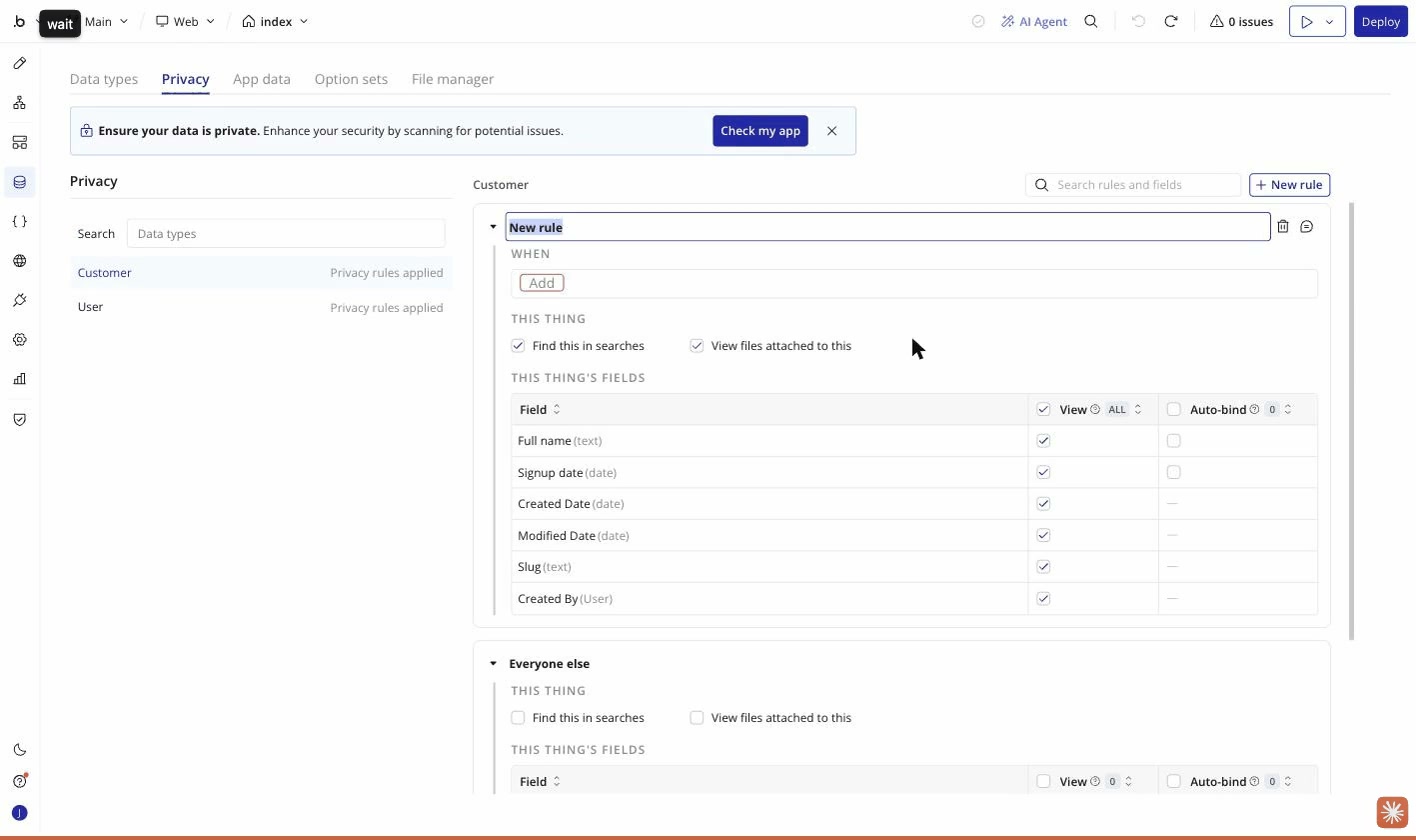
Bubble’s privacy rule editor for Customer data, including field visibility controls.
Customer privacy controls in Bubble · Comparison checked September 7, 2026

Bubble

Change the rules yourself.

Choose Bubble to edit workflow steps and data permissions in a visual editor. Bubble also builds native mobile apps.

The catch

Bubble doesn’t export runnable source code. Moving a Bubble app means rebuilding the app, and publishing needs a paid plan.

$32 / month for Starter (Web), the first paid plan

Prices checked September 7, 2026

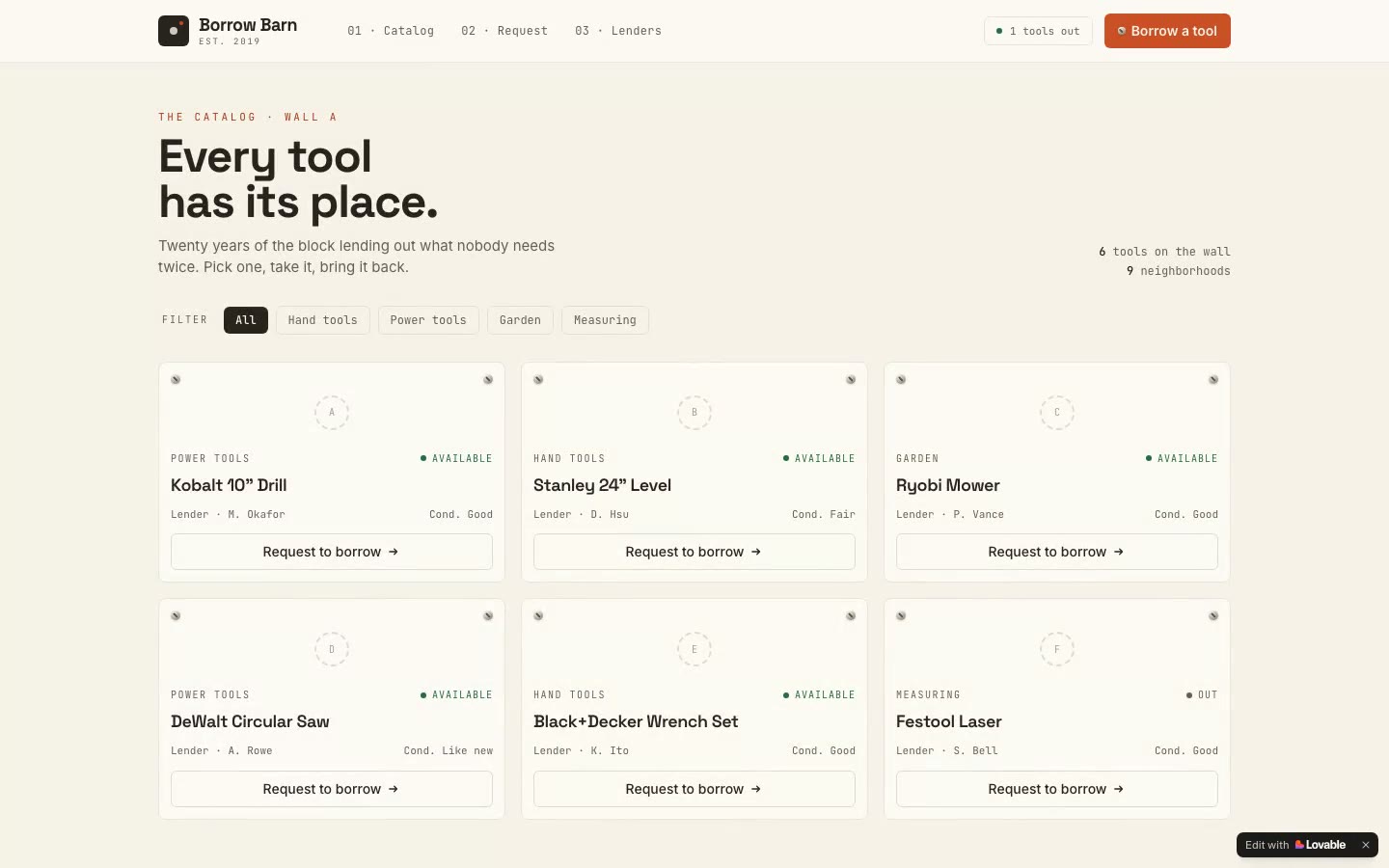
The BorrowBarn tool catalog built with Lovable, showing six tools available to borrow.
The BorrowBarn app built with Lovable · Comparison checked September 1, 2026

Lovable

Build a web app. Keep the code.

Choose Lovable to build a web app and hand the code to a developer through GitHub. GitHub export is free.

The catch

Lovable changes app logic through prompts or code. It has no visual workflow or condition editor. App-store packaging needs an outside wrapper. Replit supports existing projects.

Lovable · 2026-10-09Source 1Source 2Source 3Source 4Source 5Lovable · 2026-10-10Source 6

$25 / month for Pro, the first paid plan

Prices checked September 1, 2026

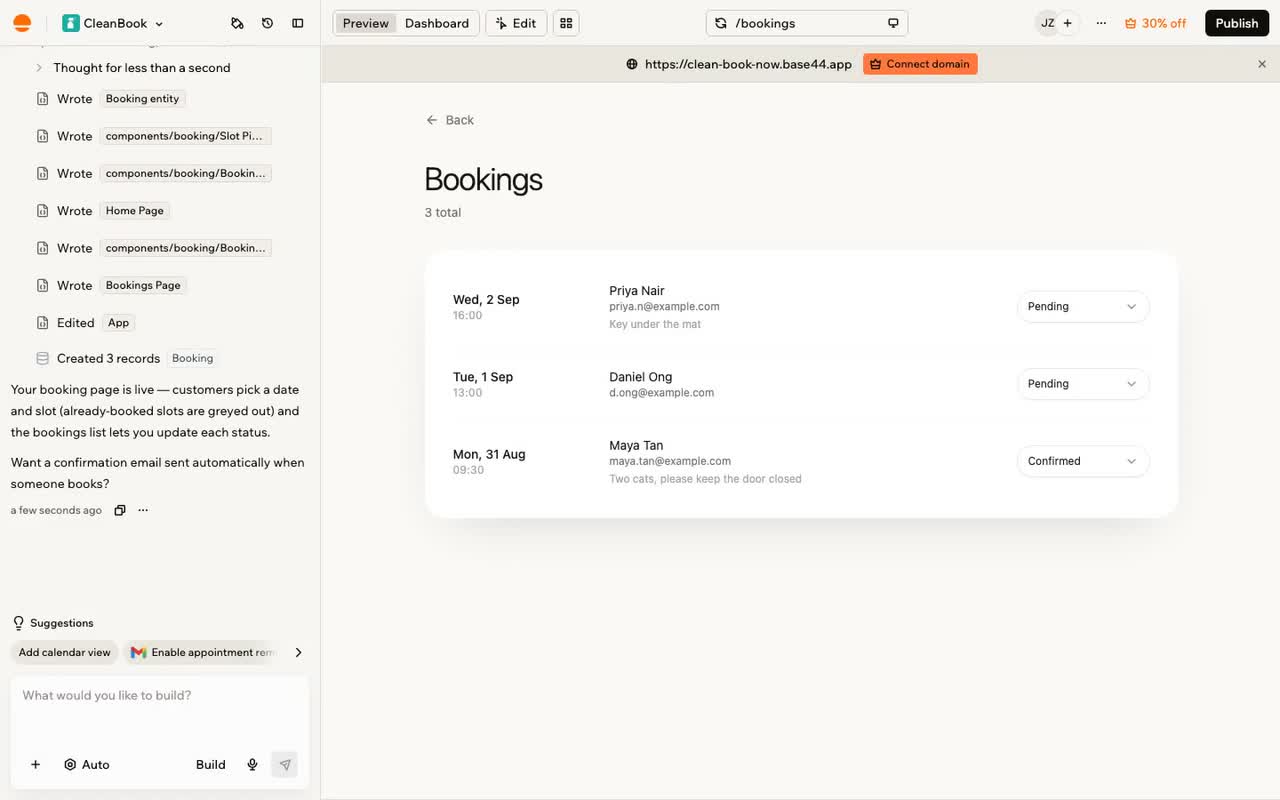
Base44’s app workspace from our published app-building recording.
App building in Base44 · Comparison checked August 29, 2026

Base44

Build and change through chat.

Choose Base44 for a portal or internal tool you mainly change through chat. Base44 can publish a web app on the Free plan within usage limits.

The catch

Base44’s workflow changes go through AI chat. Code export needs Base44’s Builder plan. Moving a Base44 app also means replacing Base44’s hosted services.

$20 / month for Starter, the first paid plan

Prices checked September 7, 2026

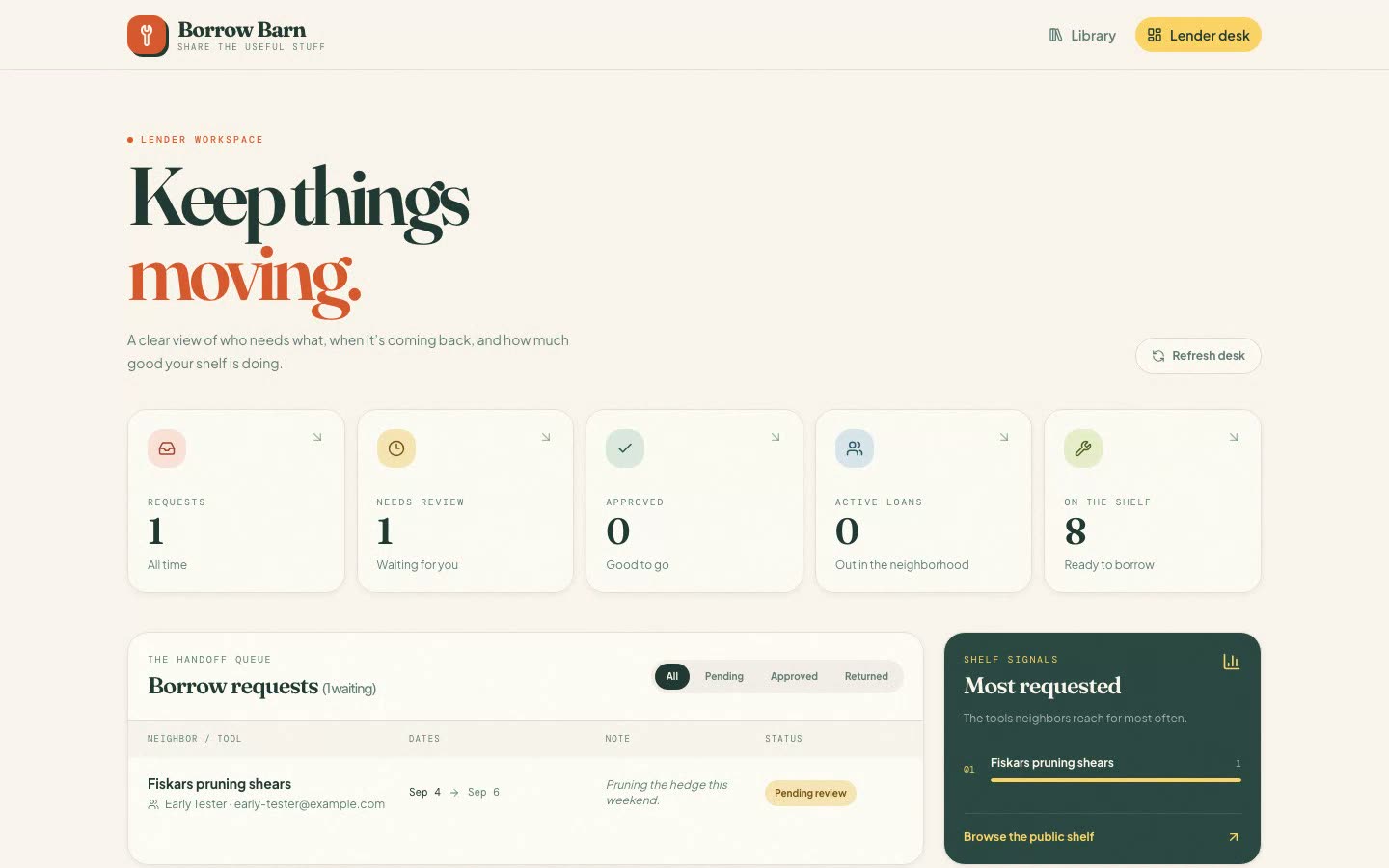
The BorrowBarn dashboard built with Replit from our published recording.
The BorrowBarn app built with Replit · Comparison checked September 1, 2026

Replit

Work directly with the project.

Choose Replit for an existing codebase, other programming languages or command-line access. You can download Replit project files on any plan.

The catch

Replit needs code for record permissions and workflows. Bubble provides direct visual workflow editing. Bubble and Base44 provide record controls.

$20 / month for Core, the first paid plan

Prices checked September 4, 2026

Prices

Check the price of the features your app needs.

First paid plans start at $ 20 per month. Feature limits can raise the price. The finder checks the plan requirements recorded for your choices.

Published prices and product details, with the date of each check.
SignalBubbleLovableBase44Replit
Pricing modelSubscription + usage allowancesChecked September 7, 2026
SourcesPricing model ↗Checked September 7, 2026
Subscription with metered usage credits. Pro credit top-ups are sold separately.Checked September 1, 2026
SourcesLovable vs Replit ↗Checked September 1, 2026
Subscription + usage allowancesChecked September 7, 2026
SourcesPricing model ↗Checked September 7, 2026
Subscription with usage credits. AI work and hosting use the same creditsChecked September 4, 2026
SourcesBase44 vs Replit ↗Checked September 4, 2026
Free tier✓Checked September 7, 2026
SourcesFree builder access ↗Checked September 7, 2026
✓Checked September 1, 2026
SourcesLovable vs Replit ↗Checked September 1, 2026
✓Checked September 7, 2026
SourcesFree builder access ↗Checked September 7, 2026
✓Checked September 4, 2026
SourcesBase44 vs Replit ↗Checked September 4, 2026
Entry paid price$32/month (Web Starter; $29/month billed annually)Checked September 7, 2026
SourcesBase44 vs Bubble ↗Checked September 7, 2026
$25/mo (Pro)Checked September 1, 2026
SourcesLovable vs Replit ↗Checked September 1, 2026
$20/month (Starter; $16/month billed annually)Checked September 7, 2026
SourcesBase44 vs Bubble ↗Checked September 7, 2026
$20/mo (Core, or $18/mo billed annually)Checked September 4, 2026
SourcesBase44 vs Replit ↗Checked September 4, 2026
Full price listFree $0 → Starter $32 → Growth $134 → Team $399 → Enterprise (sales)Checked September 7, 2026
SourcesBase44 vs Bubble ↗Checked September 7, 2026
Free $0 → Pro $25 → Business $50 → Enterprise (sales)Checked September 1, 2026
SourcesLovable vs Replit ↗Checked September 1, 2026
Free $0 → Starter $20 → Builder $50 → Pro $100 → Elite $200 → Enterprise (sales)Checked September 7, 2026
SourcesBase44 vs Bubble ↗Checked September 7, 2026
Starter $0 → Core $20 → Pro $100 → Enterprise (sales)Checked September 4, 2026
SourcesBase44 vs Replit ↗Checked September 4, 2026
Exported source filesRecords and app configuration can be exported. Runnable app source code cannot.Checked September 7, 2026
SourcesExport app source code ↗Checked September 7, 2026
GitHub sync exports the code for free. The one-click download is paid.Checked September 1, 2026
SourcesDownload the codebase & self-host it ↗Checked September 1, 2026
Builder exports code and backend functions. Collections can be downloaded separately as CSV. The hosted database and sign-in service must be replaced.Checked September 4, 2026
SourcesDownload the codebase & self-host it ↗Checked September 4, 2026
The project file tree can be downloaded as a ZIP on any plan. Git history is included.Checked September 4, 2026
SourcesDownload the codebase & self-host it ↗Checked September 4, 2026
Billing cyclesMonthly and annualChecked September 7, 2026
SourcesBase44 vs Bubble ↗Checked September 7, 2026
Monthly & annualChecked September 1, 2026
SourcesLovable vs Replit ↗Checked September 1, 2026
Monthly and annualChecked September 7, 2026
SourcesBase44 vs Bubble ↗Checked September 7, 2026
Monthly & annual (annual saves up to 10%)Checked September 4, 2026
SourcesBase44 vs Replit ↗Checked September 4, 2026
Security posture (stated)SOC 2 Type II and a GDPR data agreement. The ISO 27001 claim on Bubble’s security page belongs to AWS.Checked September 7, 2026
SourcesSecurity standards (stated) ↗Checked September 7, 2026
SOC 2 Type II + ISO 27001:2022 + GDPRChecked September 1, 2026
SourcesLovable vs Replit ↗Checked September 1, 2026
SOC 2 Type II and ISO 27001; GDPR commitments. PCI DSS refers to payment providers.Checked September 7, 2026
SourcesSecurity standards (stated) ↗Checked September 7, 2026
SOC 2 Type 2 is Replit's own. ISO 27001 is claimed for Replit’s cloud provider, not for ReplitChecked September 4, 2026
SourcesBase44 vs Replit ↗Checked September 4, 2026
Public API✓Checked September 7, 2026
SourcesPublic API ↗Checked September 7, 2026
✓Checked August 29, 2026
SourcesBase44 vs Lovable ↗Checked August 29, 2026
✓Checked September 7, 2026
SourcesPublic API ↗Checked September 7, 2026
Not recordedThe record checks generated APIs for an app’s data and developer tools. It doesn’t establish whether Replit offers a public platform API.
Named integrations foundStripe, Google Maps, OpenAI, Anthropic and Figma; plugins and API connections.Checked September 7, 2026
SourcesNamed integration examples ↗Checked September 7, 2026
96 connectors live, and connecting them costs no creditsChecked September 1, 2026
SourcesLovable vs Replit ↗Checked September 1, 2026
Slack, Notion, Salesforce, Gmail and Google Drive; built-in connectors and connections using your own credentials.Checked September 7, 2026
SourcesNamed integration examples ↗Checked September 7, 2026
450+ advertised, 501 on the directory's own counter. Most need CoreChecked September 4, 2026
SourcesBase44 vs Replit ↗Checked September 4, 2026
Mobile app outputNative iOS and Android apps through Bubble’s React Native editor. Mobile publishing has its own plan options.Checked September 7, 2026
SourcesMobile app output ↗Checked September 7, 2026
No built-in store packaging. You can use a home-screen web app or wrap exported code yourself.Checked September 1, 2026
SourcesPackage for the iOS & Android app stores ↗Checked September 1, 2026
App-store files can be prepared in the editor; downloading them requires Builder or above.Checked September 7, 2026
SourcesMobile app output ↗Checked September 7, 2026
Native output through Expo, with store submission through your own developer account.Checked September 4, 2026
SourcesPackage for the iOS & Android app stores ↗Checked September 4, 2026
Stated data residencyUS on shared hosting. Enterprise dedicated hosting lets you choose an available AWS region.Checked September 7, 2026
SourcesWhere app data is stored ↗Checked September 7, 2026
EU, US or Asia Pacific — no cross-region movement by defaultChecked August 29, 2026
SourcesBase44 vs Lovable ↗Checked August 29, 2026
US by default. Elite and Enterprise can choose EU or UK storage as the feature rolls out; processing may happen elsewhere.Checked September 7, 2026
SourcesWhere app data is stored ↗Checked September 7, 2026
The privacy policy says services are primarily hosted in the US, with other unnamed hosting jurisdictions.This describes the service’s hosting geography. It doesn’t establish a guaranteed or selectable region for your app’s data.Checked September 5, 2026
SourcesPrivacy Policy ↗Checked September 5, 2026
Public status page✓Checked September 7, 2026
SourcesPublic status page ↗Checked September 7, 2026
✓Checked June 16, 2026
SourcesBubble vs Lovable ↗Checked June 16, 2026
✓Checked September 7, 2026
SourcesPublic status page ↗Checked September 7, 2026
Not recordedThe published records contain no check of a Replit service-status page.
Self-serve signup✓Checked September 7, 2026
SourcesBase44 vs Bubble ↗Checked September 7, 2026
✓Checked September 1, 2026
SourcesLovable vs Replit ↗Checked September 1, 2026
✓Checked September 7, 2026
SourcesBase44 vs Bubble ↗Checked September 7, 2026
✓Checked September 4, 2026
SourcesBase44 vs Replit ↗Checked September 4, 2026
Team pricingWeb Growth includes 2 editors; Web Team includes 5.Checked September 7, 2026
SourcesBase44 vs Bubble ↗Checked September 7, 2026
By credits, unlimited members on every planChecked September 1, 2026
SourcesLovable vs Replit ↗Checked September 1, 2026
Members share the workspace owner’s plan and credit pool, without separate seats.Checked September 7, 2026
SourcesBase44 vs Bubble ↗Checked September 7, 2026
No seat fees: 5 collaborators on Core, 15 plus 50 viewers on ProChecked September 4, 2026
SourcesBase44 vs Replit ↗Checked September 4, 2026
The vendor’s mobile appNot recordedThe record establishes mobile apps built with Bubble, but doesn’t establish a mobile app for using the Bubble builder.iOS & AndroidChecked September 1, 2026
SourcesLovable vs Replit ↗Checked September 1, 2026
iOS & AndroidChecked September 4, 2026
SourcesBase44 vs Replit ↗Checked September 4, 2026
iOS & AndroidChecked September 4, 2026
SourcesBase44 vs Replit ↗Checked September 4, 2026
The company behind the productBubble Group, Inc.Checked September 7, 2026
SourcesWho runs it ↗Checked September 7, 2026
Lovable Labs IncorporatedChecked September 1, 2026
SourcesLovable vs Replit ↗Checked September 1, 2026
Wix.com Ltd.Checked September 7, 2026
SourcesWho runs it ↗Checked September 7, 2026
Replit, Inc.Checked September 4, 2026
SourcesBase44 vs Replit ↗Checked September 4, 2026
What the meter countsWorkload units for the server work the app performs.Checked September 7, 2026
SourcesBase44 vs Bubble ↗Checked September 7, 2026
Builder work uses credits in the September 1 record. Published pages are free to host; backend activity and in-app AI use Run credits.Checked September 11, 2026
SourcesHow Lovable hosts your app - Lovable Documentation ↗Checked September 11, 2026Lovable vs Replit ↗Checked September 1, 2026Base44 vs Lovable ↗Checked August 29, 2026
Message credits for building and integration credits for app actions.Checked September 7, 2026
SourcesBase44 vs Bubble ↗Checked September 7, 2026
One pool. Effort-based checkpoints for the agent, then metered compute, requests & storage for hostingChecked September 4, 2026
SourcesBase44 vs Replit ↗Checked September 4, 2026
What the free tier actually holdsDevelopment version; 1 app editor and 50,000 workload units per month.Checked September 7, 2026
SourcesWhat the free plan includes ↗Checked September 7, 2026
5 build credits/day (30/mo cap) + 20 Cloud credits + 4 AI credits monthly. The code editor is read-onlyChecked September 1, 2026
SourcesLovable vs Replit ↗Checked September 1, 2026
Build and publish up to 5 apps; 25 message credits/month, capped at 5/day, plus 100 integration credits/month.Checked September 7, 2026
SourcesWhat the free plan includes ↗Checked September 7, 2026
Daily agent credits to an unpublished monthly cap. 1 published app carrying a Replit badge, and its link goes down after 30 daysChecked September 4, 2026
SourcesBase44 vs Replit ↗Checked September 4, 2026
Published hosting rate cardHosting is included in the project plan. Extra workload and storage can add charges.The record doesn’t establish unit prices for hosting, workload or extra storage.Checked September 7, 2026
SourcesHosting costs ↗Checked September 7, 2026
Published pages are free to host. Backend activity and in-app AI use Run credits.Checked September 11, 2026
SourcesHow Lovable hosts your app - Lovable Documentation ↗Checked September 11, 2026Lovable vs Replit ↗Checked September 1, 2026
None. Hosting is included in the plan, and every app gets a base44.app address from the moment it existsChecked September 4, 2026
SourcesBase44 vs Replit ↗Checked September 4, 2026
Printed in full: Autoscale $2/mo + $0.60 per 1M compute units, Reserved VM from $15/mo, static freeChecked September 4, 2026
SourcesBase44 vs Replit ↗Checked September 4, 2026
Your work as training dataTerms allow training on prompts and AI responses. Keeping app records private does not exclude those AI interactions.Checked September 7, 2026
SourcesYour work as AI training data ↗Checked September 7, 2026
Free and Pro users can disable training for their own contributions in account settings. Business and Enterprise workspace data is excluded by default.Checked September 7, 2026
SourcesManage training data and privacy ↗Checked September 7, 2026
Terms allow training on customer data and generated output. A workspace training opt-out is listed on Enterprise.Checked September 7, 2026
SourcesYour work as AI training data ↗Checked September 7, 2026
Replit excludes private projects, and Pro and Enterprise are excluded by contract. Free third-party model providers may still train on prompts and responses.Checked September 4, 2026
SourcesBase44 vs Replit ↗Checked September 4, 2026Manage training data and privacy ↗Checked September 5, 2026
What the app's own AI costsNot recordedThe record covers connections to AI providers, but doesn’t establish the charges for AI requests made by a published Bubble app.The September 1 pricing record lists 4 AI credits per month on Free. In-app AI uses Run credits.The September 11 hosting documentation confirms Run-credit usage. The record doesn’t establish per-request or model-specific rates.Checked September 11, 2026
SourcesHow Lovable hosts your app - Lovable Documentation ↗Checked September 11, 2026Lovable vs Replit ↗Checked September 1, 2026
Nothing extra. Model calls, images and video draw on the plan's integration credits, 100/mo on freeChecked September 4, 2026
SourcesBase44 vs Replit ↗Checked September 4, 2026
Replit-managed credentials require paid access and bill public API prices to Replit credits; Pro and Enterprise admins must enable them. Starter can use your own key and pay the provider directly.Checked September 11, 2026
SourcesReplit AI Integrations - Replit ↗Checked September 11, 2026Base44 vs Replit ↗Checked September 4, 2026
The vendor’s desktop appNot recordedThe record doesn’t establish a desktop application for using the Bubble builder.A desktop app is recorded. The operating systems aren’t specified.The record doesn’t establish which desktop operating systems are supported.Checked September 1, 2026
SourcesLovable vs Replit ↗Checked September 1, 2026
✗Checked September 4, 2026
SourcesBase44 vs Replit ↗Checked September 4, 2026
Mac & WindowsChecked September 4, 2026
SourcesBase44 vs Replit ↗Checked September 4, 2026
Code export planNo plan exports runnable app source.Checked September 7, 2026
SourcesBase44 vs Bubble ↗Checked September 7, 2026
GitHub export is free. The one-click download requires a paid plan.Checked September 1, 2026
SourcesDownload the codebase & self-host it ↗Checked September 1, 2026
Builder: $40/month billed annually.Checked September 7, 2026
SourcesBase44 vs Bubble ↗Checked September 7, 2026
Any plan, including Free.Checked September 4, 2026
SourcesDownload the codebase & self-host it ↗Checked September 4, 2026
What the plan coversOne project. Separate projects need separate paid plans.Checked September 7, 2026
SourcesBase44 vs Bubble ↗Checked September 7, 2026
Members share credits, with unlimited members on every plan.The record doesn’t establish how many paid apps or projects one subscription covers.Checked September 1, 2026
SourcesLovable vs Replit ↗Checked September 1, 2026A shared credit pool with per-member caps ↗Checked September 1, 2026
One workspace; paid plans list unlimited apps sharing its credits.Checked September 7, 2026
SourcesBase44 vs Bubble ↗Checked September 7, 2026
Core allows 5 collaborators. Pro allows 15 collaborators and 50 viewers. Team credits are shared.The record doesn’t establish how many paid apps or projects one subscription covers.Checked September 4, 2026
SourcesBase44 vs Replit ↗Checked September 4, 2026A shared credit pool with per-member caps ↗Checked September 4, 2026
Entry paid-plan allowanceWeb Starter: 175,000 workload units per month.Checked September 7, 2026
SourcesBase44 vs Bubble ↗Checked September 7, 2026
Pro starts with 100 credits per month. Higher credit allowances are available.Checked September 1, 2026
SourcesLovable vs Replit ↗Checked September 1, 2026
Starter: 100 message credits and 2,000 integration credits per month.Checked September 7, 2026
SourcesBase44 vs Bubble ↗Checked September 7, 2026
Core: $20 in monthly usage credits.Checked September 4, 2026
SourcesBase44 vs Replit ↗Checked September 4, 2026
Connect external APIsAPI Connector is included on Free; Web Starter publishes the connected app.Checked September 7, 2026
SourcesBase44 vs Bubble ↗Checked September 7, 2026
External API connections and custom connectors are recorded.The record doesn’t establish plan requirements or charges for arbitrary external API connections. Named connector access is a separate check.Checked June 16, 2026
SourcesBubble vs Lovable ↗Checked June 16, 2026
Backend functions and integrations that use them require Builder: $40/month annually.Checked September 7, 2026
SourcesBase44 vs Bubble ↗Checked September 7, 2026
Most third-party connectors require Core at $20/month. Free keeps Replit-managed database, storage, authentication and domains.Connector access doesn’t establish the price or restrictions for calling any external API from your own code.Checked September 4, 2026
SourcesOne-click connectors to the tools you use ↗Checked September 4, 2026
Extra usageWorkload tiers or usage overages; paid plugins and extra storage can add charges.Checked September 7, 2026
SourcesBase44 vs Bubble ↗Checked September 7, 2026
Pro credit top-ups: $15 for 50 credits.Checked September 1, 2026
SourcesLovable vs Replit ↗Checked September 1, 2026
Credit top-ups or a higher allowance. Third-party services bill separately.Checked September 7, 2026
SourcesBase44 vs Bubble ↗Checked September 7, 2026
Usage beyond plan limits can incur extra fees, which may be charged automatically to the saved payment method.Checked September 5, 2026
SourcesTerms of Service ↗Checked September 5, 2026
Control the billOverages can be disabled. Warnings at 75% and 100% of workload allowance.Checked September 7, 2026
SourcesControl the bill ↗Checked September 7, 2026
Per-member credit caps require paid admin roles. Monthly plan credits expire two months after issue.The record doesn’t establish general spending alerts or automatic shutdown controls for each plan.Checked September 1, 2026
SourcesA shared credit pool with per-member caps ↗Checked September 1, 2026Lovable vs Replit ↗Checked September 1, 2026
Separate message and integration allowances; unused monthly credits expire. Free building also has a 5-credit daily cap.Checked September 7, 2026
SourcesControl the bill ↗Checked September 7, 2026
Team credits are shared. Per-person spending caps and spending views require Enterprise. The recorded budgets use $500 increments.The record establishes these team controls. It doesn’t establish which general spending alerts or automatic shutdown controls are available on each self-serve plan.Checked September 4, 2026
SourcesA shared credit pool with per-member caps ↗Checked September 4, 2026
Hosting costsManaged hosting is included in the project plan. Extra workload and storage can add charges.Checked September 7, 2026
SourcesHosting costs ↗Checked September 7, 2026
Published pages are free to host. Backend activity and in-app AI use Run credits.The record doesn’t establish Run-credit rates for a particular app. A new custom domain requires a paid plan.Checked September 11, 2026
SourcesHow Lovable hosts your app - Lovable Documentation ↗Checked September 11, 2026Lovable vs Replit ↗Checked September 1, 2026
Hosting is included. Apps share the workspace’s credit allowances; connected services can charge separately.Checked September 7, 2026
SourcesHosting costs ↗Checked September 7, 2026
Autoscale: $2/month plus $0.60 per million compute units. Reserved VM starts at $15/month. Static hosting is free.Checked September 4, 2026
SourcesBase44 vs Replit ↗Checked September 4, 2026
Help when something breaksSupport center and community forum. Enterprise adds an account manager and technical support; service levels depend on the support tier.Checked September 7, 2026
SourcesHelp when something breaks ↗Checked September 7, 2026
Enterprise support and professional services are recorded.The record doesn’t establish self-serve support channels, response commitments or detailed plan coverage.Checked June 16, 2026
SourcesBubble vs Lovable ↗Checked June 16, 2026
Docs, AI help, Discord and support tickets. Base44 support covers the platform and billing. Base44 support doesn’t fix your app’s code.Checked September 7, 2026
SourcesHelp when something breaks ↗Checked September 7, 2026
Not recordedThe published records don’t establish Replit’s support channels, plan requirements or response commitments.

The full record

Check the capabilities you need.

141 capabilities with dates and linked sources where available.

Building and editing apps

Building and editing apps: Bubble, Lovable, Base44, Replit, with the date of each answer.
CapabilityBubbleLovableBase44Replit
A library of prompts & use-cases to start fromReal prompts, sorted by what you’re trying to build.
Unconfirmed
For Bubble, the guide gives sample prompts, but does not establish a browsable prompt library organized by use case.

The guide gives sample prompts, but does not establish a browsable prompt library organized by use case.

Sep 12

Source details haven’t been published for this answer.

Lovable provides example prompts and use cases to help you start an app.Aug 29Published comparison record
Base44 provides example prompts and use cases to help you start an app.Aug 29Published comparison record
Replit provides prompt collections on its website, grouped by app type. These are starting examples, rather than a prompt-management tool inside the editor.

Official website prompt collections, organized by app/use-case type; this does not claim an in-editor prompt-management product or that each requested app feature is delivered automatically.

Sep 12
Build apps & websites from plain languageType what you want and get a working app back.
Describe a web app in plain language for AI to build. Direct changes by Bubble’s AI Agent are limited to web apps.Jun 16Published comparison record
In Lovable, describe the app or website you want in plain language for the builder to create it.Sep 1Published comparison record
In Base44, describe the app or website you want in plain language for the builder to create it.Sep 4Published comparison record
In Replit, describe the app or website you want in plain language for the builder to create it.Sep 4Published comparison record
Build apps and websitesCreate an app with pages, data and actions.
In Bubble, build apps with pages, stored data and actions.Sep 7Published comparison record
In Lovable, describe an app for AI to build, with a backend and publishing support included.Sep 11
In Base44, build apps with pages, stored data and actions.Sep 7Published comparison record
In Replit, describe what you want to build; Agent creates a web app from the prompt.Sep 11
Community templates to start fromOpen a working app somebody else built and make it yours.
In Bubble, start a new project from a marketplace template; it cannot be added to an existing app. Terms and quality vary by template.

A template starts a new project; it cannot be added to an app after creation. Template-specific marketplace terms and quality vary; this is not a guarantee that every community template is production-ready.

Sep 11
In Lovable, start from an app someone else built and customise it for your own project.Sep 1Published comparison record
In Base44, clone a community app from the marketplace and customise it. Listings show how often each template has been cloned.Sep 4Published comparison record
Start from an app in Replit’s Gallery. The previous starter-template library has been retired.Sep 4Published comparison record
Flexible app navigation & routingControl screens, routes and navigation down to the details.
In Bubble, set up app screens and navigation visually in the editor.Jun 16Published comparison record
Lovable: Routes live in the generated code, with the rendering mode set for each route.Jun 16Published comparison record
In Base44, configure menus and navigation through generated app code, for up to 600 pages. Private pages need routing and data rules, not a visibility switch.

Navigation is configured through AI-generated app code and menus. Up to 600 pages; individual public/private visibility needs routing/data rules rather than a per-page visibility switch.

Sep 11
Replit: Agent-generated or edited code controls screens and routes. Advanced routing is not necessarily available as a visual setting.

Implemented through Agent-generated or edited application code; multilingual route examples and mobile screen-flow editing demonstrate the control. No claim that every advanced router feature is a built-in visual control.

Sep 12
Give the builder an image as inputGive the builder a screenshot or mockup to use as the starting point.
In Bubble, use up to five JPG, PNG, GIF or WebP images to guide the design. Agent recreates the interface; it cannot insert the uploaded image directly into the canvas.

Upload up to five JPG, PNG, GIF or WebP images with the prompt. The Agent replicates the desired UI using Bubble elements and presents a plan for approval. This is image-guided UI construction; the guide says asking the Agent to insert the uploaded image directly into the canvas is not supported.

Sep 11
In Lovable, use a screenshot or mockup as input when building the app.Sep 1Published comparison record
In Base44, use a screenshot or mockup as a starting point. The first prompt can also include PDFs and spreadsheets.Sep 4Published comparison record
In Replit, use a screenshot or mockup as input when building the app.Sep 4Published comparison record
Interactive prototyping & validationClick through a working prototype before you commit.
In Bubble, open and test an interactive prototype before committing to the app.Jun 16Published comparison record
In Lovable, open and test an interactive prototype before committing to the app.Jun 16Published comparison record
Base44: Interactive preview is free. Building or changing the prototype uses credits.

Interactive preview is free; building or changing the prototype uses credits.

Sep 11
In Replit, share an interactive demo with a working interface, backend logic and database so others can test it.Sep 11
Point at an element and change it in plain wordsClick the thing that's wrong and say what you want instead.
In Bubble, select an app element to give Agent context, then describe the change you want.Sep 11
Select an element and describe a change. Lovable bills these edits as chat.Sep 1Published comparison record
In Base44, select an element and describe the change in chat. Simple direct visual edits use no AI credits; Edit mode can undo 50 steps.Sep 4Published comparison record
In Replit, select an element and describe the change. Simple direct text, colour and spacing edits write to the source without agent credits.Sep 4Published comparison record
Preview the appOpen the current version before publishing.
In Bubble, open the current working version of the app before publishing it.Sep 7Published comparison record
Lovable: Preview shows the latest working version. The live site changes only when you publish.Sep 11
In Base44, open the current working version of the app before publishing it.Sep 7Published comparison record
In Replit, use Preview to test the app and its main user journey before publishing.Sep 11
Template marketplaceStart from a ready-made app.
In Bubble, start from a ready-made app template and customize it.Sep 7Published comparison record
In Lovable, remix ready-made app templates on any plan. Each remix creates an independent copy you can edit.Sep 11
In Base44, start from a ready-made app template and customize it.Sep 7Published comparison record
In Replit, start from customizable template code. A template is not a complete managed marketplace business.

Templates are customizable starting code; they do not promise a complete managed marketplace business.

Sep 11
Unlimited app creationCreate as many apps as you want.
Bubble: Unlimited app creation is available through the Agency Account, which is billed per seat.Jun 16Published comparison record
In Lovable, create an unlimited number of apps.Jun 16Published comparison record
Base44: Starter or higher allows unlimited apps; Free allows up to five. Message and integration credit limits still apply.

Starter or above; Free supports up to five apps. Unlimited app count does not remove message/integration credit limits.

Sep 11
Unconfirmed
Replit: Unlimited published apps are documented, but the sources do not separately confirm unlimited app creation.Sep 12

Source details haven’t been published for this answer.

Visual app & website builderLay out screens and pages by eye and build the whole thing visually.
In Bubble, use visual controls to lay out app screens and website pages.Jun 16Published comparison record
In Lovable, use visual controls to lay out app screens and website pages.Jun 16Published comparison record
Unconfirmed
Base44: Visual appearance editing is documented; building the whole app visually is not established by these sources.Sep 11

Source details haven’t been published for this answer.

Unconfirmed
Replit’s official FAQs describe limits on visual app building. Full visual app building remains unconfirmed.Sep 11

Source details haven’t been published for this answer.

AI assistance

AI assistance: Bubble, Lovable, Base44, Replit, with the date of each answer.
CapabilityBubbleLovableBase44Replit
AI agents that act across your connected toolsAn agent that reads and acts in the tools you've connected, after the build.
In Bubble, build and configure agents using app workflows, connected tools and external AI models. What they can do depends on the integrations you set up.

These are agents the customer builds and configures in the app using workflows, connected tools and external model integrations. The page is a vendor product description, not a tested guarantee that an agent can act in every third-party tool.

Sep 11
Lovable: Connected tools can keep running app automations after the build, without another prompt.Sep 1Published comparison record
Base44: Superagents can act on a schedule or event and use a browser you have signed into.Sep 4Published comparison record
Replit: Routines require Core, allow up to 5 active routines and run at most hourly. They live in a conversation, separately from your app.Sep 4Published comparison record
Bring-your-own AI model integrationsConnect models like GPT or Claude and use them in your app's features.
In Bubble, connect external AI models and use them in your app’s features.Jun 16Published comparison record
In Lovable, connect external AI models and use them in your app’s features.Jun 16Published comparison record
Backend-powered integrations require Builder or higher, your provider API key and separate provider charges. These differ from Base44’s managed AI service.

Builder plan or above for backend-powered AI integrations; own provider API key and provider charges. Managed InvokeLLM and bring-your-own provider integrations are separate methods.

Sep 11
Replit: Starter can use your own API keys, stored in secrets and billed by the provider. Managed credentials need paid access; Pro and Enterprise admins must enable it.

BYOK calls are billed directly by the provider; keys are stored in secrets. Managed credentials require paid access; Starter can use own keys. Pro/Enterprise managed access is disabled until an admin enables it.

Sep 11
Change an app through AI chatAsk the builder to change the app in plain language.
Ask AI to change the app through chat. Bubble’s AI Agent is in beta.Sep 7Published comparison record
Lovable: Build mode makes changes directly in your project from your chat instructions.Sep 11
In Base44, ask the builder to change your app through plain-language chat.Sep 7Published comparison record
Ask in everyday language for changes, new features or fixes, and Replit can edit the app.Sep 11
Choose the AI model behind the builderChoose the AI model the builder uses.
Unconfirmed
The source lets an app choose its AI model. It does not show choosing the model used by Bubble’s builder.Sep 11

Source details haven’t been published for this answer.

Lovable chooses the models for Build and Plan modes. There is no selector for the builder’s model; choosing models inside your own app is separate.Sep 11
Can I choose which model Lovable uses in Build mode or Plan mode? No. Lovable manages the underlying model used by the agent in Build mode and Plan mode . The agent runs on current frontier models, and Lovable rolls out model upgrades automatically to all users, so there is no setting to switch the agent between specific models. If you want to choose a specific model for AI features inside your own deployed app, see AI features for your app , which lists the supported models you can call from your app.
FAQ - Lovable Documentation
No. The built-in AI connector adds AI features to the apps you build with Lovable. The Lovable agent is what helps you build and edit your project.The models listed on this page are available for AI features inside your app. They are not the models Lovable uses to write, edit, or reason about your code.
AI features for your app - Lovable Documentation
Base44: Builder lets you choose between six listed AI models for the builder.Sep 4Published comparison record
Replit: Core lets you choose between 13 listed models in Power or Max mode.Sep 4Published comparison record
Create AI agentsBuild an agent that can carry out tasks.
In Bubble, build an AI agent that can carry out tasks.Sep 7Published comparison record
In Lovable, configure the AI features, backend and connector permissions. An admin must enable each connector’s offline access for an agent to use connected data while you are away.

For agents acting on connected user data while the user is away, an admin must deliberately enable offline access for each connector. The app acts within configured connector scopes and user permissions; AI features and backend setup must be configured for the intended task.

Sep 12
In Base44, build an AI agent that can carry out tasks.Sep 7Published comparison record
Replit: Agent can build an agent or workflow as app code. Actions in external services require the relevant integrations and permissions.

Agent-created agents/workflows are app implementations; external actions need the relevant integrations and permissions.

Sep 11
Generate images & media inside the builderImages and video made where you’re building, with nothing sourced outside.
Unconfirmed
Bubble: Image generation is documented, but the question also requires video generation and the sources do not establish that.Sep 11

Source details haven’t been published for this answer.

Lovable generates images and video inside the builder.Sep 1Published comparison record
Base44 generates images, video and speech using integration credits. The recorded free allowance is 100 credits a month.Sep 4Published comparison record
Replit generates images, video, icons and audio using the agent's credits.Sep 4Published comparison record
Generate images, video & speech with AIMedia made inside the builder instead of sourced elsewhere.
Unconfirmed
For Bubble, the sources document image generation and playing existing videos, not generating the video and speech this question also requires.

The sources document image generation and playing existing videos, not generating the video and speech this question also requires.

Sep 11

Source details haven’t been published for this answer.

Lovable creates AI images, video and speech inside the builder.Aug 29Published comparison record
Base44 generates images, video and speech using integration credits. The recorded free allowance is 100 credits a month.Aug 29Published comparison record
Builder workflows create images, audio and short or code-made videos. Replit AI Integrations separately does not support video output.

Video evidence covers short clips/animations and programmatic video; image/audio use their respective builder workflows. Do not extend this to video output through Replit AI Integrations, whose separate documentation says video output is unsupported.

Sep 11
Hours-long unattended agent runsGive the agent a large task and come back later.
Unconfirmed
For Bubble, the Agent guide does not establish multi-hour unattended runs. A separate app-workflow time limit does not answer the builder question.

The Agent guide does not establish multi-hour unattended runs. A separate app-workflow time limit does not answer the builder question.

Sep 12

Source details haven’t been published for this answer.

Lovable: Build can run up to 10 hours. Beta check-ins pause at 20 credits by default; raise or disable them for unattended work. A zero credit balance still pauses the run.

Lovable Build mode can run a single message for up to 10 hours; this is a documented maximum, not a guarantee every task runs that long or completes successfully. Long-running credit check-ins pause at 20 credits by default. To leave a long run unattended beyond a check-in threshold, disable check-ins or set a sufficiently high threshold; reaching a threshold otherwise requires Continue. A zero workspace credit balance pauses the run regardless of check-in settings. Enough credits must remain for the work; paid top-up availability is separate from eligibility for the long-running feature. The documented long-running credit-check-in feature is in beta.

Sep 12
A single message can run for up to 10 hours, so a long run can check in several times along the way.
Credits and usage - Lovable Documentation
For long-running Build mode messages, Lovable checks in when a single message crosses your credit check-in level, 20 credits by default. The run pauses with a card showing what the message has cost so far. Choose Continue to keep going, optionally typing a new check-in level first (it becomes your default), or Finish up to have Lovable finish the work in progress and stop.
Credits and usage - Lovable Documentation
Stronger execution See exactly what's happening at every step. Lovable generates detailed task lists and executes multi-step features independently thanks to a longer-running agent.
Build more. Manage less. | Lovable
For Base44, the builder works in turns and stops its message queue when the editor closes. Unattended Superagents operate inside an app; they do not build it.Sep 4Published comparison record
Replit: Agent 3 is documented to work unattended for up to 200 minutes.Sep 4Published comparison record
In-app AI image generationGenerate images for your app without leaving the builder.
In Bubble, generate image assets for the app from inside the builder.Jun 16Published comparison record
In Lovable, generate image assets for the app from inside the builder.Jun 16Published comparison record
Unconfirmed
Base44 documents in-app image generation and builder logo generation separately. These are different uses, so support depends on which use you need.Sep 11

Source details haven’t been published for this answer.

Replit: Agent generates image assets in the builder. This does not automatically add image generation for the app's end users.

This is builder asset generation; it does not by itself expose image generation to end users at app runtime.

Sep 11
Natural-language chat interfaceBuild by chatting in plain English.
In Bubble, build through a conversational interface connected to external AI models.Jun 16Published comparison record
In Lovable, build the app by describing what you want in a chat.Jun 16Published comparison record
In Base44, describe the app in a conversation and AI generates it from your instructions.Sep 11
In Replit, build the app by describing what you want in a chat.Sep 11
Plan the product with AI before you buildShape the feature list before anything is generated.
In Bubble, review the proposed feature cards and add missing features before generating the app.Sep 11
Lovable: Plan mode lets you discuss the product before building. The recorded rate is one credit per message.Sep 1Published comparison record
Base44: Discuss mode plans without building until you approve. It is available on every plan at 0.3 credits per message.Sep 4Published comparison record
Replit: Plan mode starts on Core. Agent planning interactions are billable.Sep 4Published comparison record
The agent tests the app in a real browserThe agent clicks through the generated app and fixes problems before you see the app.
Unconfirmed
For Bubble, the Agent uses an issue checker and data queries. The docs do not show it testing the finished interface in a real browser.

The Agent uses an issue checker and data queries. The docs do not show it testing the finished interface in a real browser.

Sep 12

Source details haven’t been published for this answer.

For Lovable, the agent can click through the generated app in a browser to find and fix problems.Sep 1Published comparison record
Base44: Browser testing is available on every plan and uses 1–4 credits per test. It cannot fill in a login form.Sep 4Published comparison record
Replit: Browser testing covers full-stack JavaScript and Streamlit apps. It is disabled in the cheapest agent mode.Sep 4Published comparison record
The built app calls an AI model with no API key of yoursThe app you shipped can ask a model something, without you opening an account at OpenAI.
Unconfirmed
For Bubble, the listing is not verified official proof, and its method still needs an app owner’s provider key.

The listing is not verified official proof, and its method still needs an app owner’s provider key.

Sep 11

Source details haven’t been published for this answer.

For Lovable, the managed AI connector uses a generated secure backend function and workspace credits, with rate limits. Calls stop at zero credits; other providers may require your own API key.

Uses Lovable’s built-in runtime AI connector and its supported models, through a generated secure backend function. AI consumes Lovable workspace credits and has request-rate limits; calls stop when credits run out. A model/provider outside the managed connector can require the user’s own key.

Sep 11
Base44: Built-in InvokeLLM uses the plan’s integration credits, including the free plan’s allowance. You do not need your own model-provider API key.Sep 4Published comparison record
Managed AI Integrations require a paid plan and charge provider API prices against Replit credits. You do not supply your own API key for this route.Sep 4Published comparison record

Design, content and search

Design, content and search: Bubble, Lovable, Base44, Replit, with the date of each answer.
CapabilityBubbleLovableBase44Replit
App-wide fonts & colours set oncePick the look in one place and every screen follows it.
In Bubble, set shared fonts, colours and styles, then apply them to the relevant elements. Changes carry through wherever those styles are used.

Shared variables or styles must be applied to the relevant elements; changes propagate wherever those definitions are used.

Sep 11
In Lovable, set app-wide fonts and colours in one place.Aug 29Published comparison record
In Base44, set global colours and fonts. This support alone does not establish a full component design system.Aug 29Published comparison record
Replit: Themes set the fonts and colours across an Agent-built app.

Applies to Themes on Agent applications as described in the saved release excerpt.

Sep 11
Control the designAdjust how pages and elements look.
In Bubble, adjust how the app’s pages and elements look.Sep 7Published comparison record
In Lovable, select an element in Edit mode and change its size, colour or text in the preview.Sep 11
In Base44, adjust how the app’s pages and elements look.Sep 7Published comparison record
For Replit, the Visual Editor works in a web browser, not the desktop or mobile apps. Simple edits avoid Agent; more complex changes can invoke Agent and use credits.

Visual Editor is available in web browsers, not the Replit mobile or desktop apps. Simple direct edits avoid Agent; hidden complexity can invoke Agent and consume credits.

Sep 11
Design systems & app-wide themingPick the look once and every screen follows it.
In Bubble, set shared styles and themes across the app’s screens.Jun 16Published comparison record
Lovable: Workspace design systems require a paid plan.Sep 1Published comparison record
Base44: Global colours and fonts are available on every plan. A full design system requires Builder, with one per workspace.Sep 4Published comparison record
Replit: Design work is available on every plan, but starting an app from a design frame needs Core. Themes are per app; design-system import is an Enterprise beta.Sep 4Published comparison record
Image management & optimizationResize and optimise images so pages stay fast.
Bubble supports resizing and optimizing images for the app.Jun 16Published comparison record
Lovable does not provide the image resizing and optimization described in this row.Jun 16Published comparison record
Unconfirmed
For Base44, the instructions ask users to resize images before uploading; they do not establish an app-wide image optimization feature.

The instructions ask users to resize images before uploading; they do not establish an app-wide image optimization feature.

Sep 11

Source details haven’t been published for this answer.

In Replit, add image optimization through app code, libraries or external services. Storing an image alone does not optimize it.

Optimization must be added to the app with code/libraries or services; it is not automatically provided by storing a file. The source does not promise particular compression ratios, delivery speed or cost.

Sep 11
Import a designStart an app from an existing design.
Bubble offers a path for importing an existing design as an app starting point.Sep 7Published comparison record
In Lovable, use the Figma plugin with a Dev seat, or desktop MCP with Dev Mode and a Dev or Full seat. Plugin exports allow 100 files at 20 MB each; building uses credits.

Figma-plugin method: at least a Dev seat in Figma; export limits are 100 files per export and 20 MB per file. The design copy can then be built in Lovable. Figma-MCP alternative: Lovable desktop and Figma desktop with Dev Mode plus a Dev or Full seat; not Figma Starter. Local MCP availability depends on workspace policy. Treat those as alternative methods, not simultaneous requirements. Do not count .fig upload alone as full design import; normal Lovable build prompts still use credits.

Sep 11
Base44 offers a path for importing an existing design as an app starting point.Sep 7Published comparison record
Replit imports supported designs, including Figma frames and Claude designs. Importing a code project does not also move its database contents or secrets.

The supported inputs are the documented design sources, not every proprietary design format. Imported code projects do not automatically migrate database contents or secrets; that is separate from design import.

Sep 11
Import a Figma design and build from itStart from the design your designer already made.
Requires a Figma plugin, Bubble token and Chrome extension. Imports Figma elements, not FigJam; some elements need fixes, and app logic must be added separately.

Requires the Figma plugin, Bubble token and Chrome extension copy/paste workflow described on the page. Figma files are supported, not FigJam; imported design still needs app data, workflows and logic. Import is element-by-element, some elements cannot convert, existing fixed positioning may remain fixed, and styles need manual application.

Sep 11
In Lovable, use the Figma plugin with a Dev seat, or desktop MCP with Dev Mode and a Dev or Full seat. Plugin exports allow 100 files at 20 MB each; building uses credits.Sep 1Published comparison record
In Base44, paste a Figma frame link to start. Requires an Editor seat because view-only seats cannot use the required Figma API.Sep 4Published comparison record
In Replit, paste a Figma frame link to use the design as the starting point.Sep 4Published comparison record
Responsive layoutsAdapt pages to different screen sizes.
Bubble: Page layouts can adapt to different screen sizes.Sep 7Published comparison record
Lovable: Generated web-app code uses responsive layout patterns to adapt pages to different screen sizes.Sep 11
Base44: Page layouts can adapt to different screen sizes.Sep 7Published comparison record
Replit: Generated apps can adapt their layouts to different screen sizes.Sep 11
SEO controls & social previewsTitles, descriptions and link previews you can actually set.
In Bubble, set page titles, descriptions and the title, description and thumbnail shown when a link is shared.Sep 11
In Lovable, set search metadata and social previews. SEO reviews are free on every plan.Sep 1Published comparison record
In Base44, set search metadata and social previews; the platform creates canonical links, a sitemap and robots.txt. A custom domain is paid and affects the SEO score.Sep 4Published comparison record
In Replit, set search metadata and social previews. The SEO Agent requires a paid plan and a published public deployment.Sep 4Published comparison record
Visual design & UI customizationChange how the app looks without starting a new prompt.
In Bubble, use the visual drag-and-drop editor to customize the app’s design without writing code.Sep 11
In Lovable, edit the design visually. These controls cannot change dynamic content coming from the database.Aug 29Published comparison record
In Base44, use visual controls to change the app’s design without starting another prompt.Aug 29Published comparison record
For Replit, the browser-only Visual Editor directly changes text, color and spacing. More complex edits may need Agent and credits.

Browser-only Visual Editor. Simple text/color/spacing changes are direct; complex or composite edits may require Agent and credits.

Sep 11
Visual edits without promptingChange how the app looks with visual controls.
In Bubble, use visual controls to change the app without relying on AI prompts.Sep 11
In Lovable, edit inline text without prompting. The 1 September record listed up to 100 free edits a day; that allowance has not been rechecked here.Sep 1Published comparison record
Base44: Visual edits do not use AI credits. You can undo up to 50 steps in a session.Sep 4Published comparison record
Replit: Simple text, colour and spacing edits work on the canvas and running app without Agent credits. More complex changes may use Agent.Sep 4Published comparison record
Website publishing & SEO controlsSet search metadata and publish the website.
In Bubble, set search metadata and publish the website.Jun 16Published comparison record
In Lovable, set search metadata and publish the website.Jun 16Published comparison record
Base44: Production SEO is designed for public apps on a custom domain. Custom tags need the appropriate injection controls; indexing and search rankings are not guaranteed.

Supported production SEO is designed for public apps on a custom domain. Custom tags require the matching platform injection controls; indexing/rankings are not guaranteed.

Sep 11
Replit: SEO Agent requires a paid plan and a published public web app. Ratings cover Autoscale, Reserved VM and Static deployments; review and republish its changes.

SEO Agent requires a paid plan and a published app. Ratings apply to public Autoscale, Reserved VM or Static web deployments; changes must be reviewed and republished.

Sep 11
White-label brandingPublish the app under your own brand and domain.
White-label branding uses the paid CoAlias plugin. It is not a built-in Bubble feature.Jun 16Published comparison record
In Lovable, publish under your own brand; connecting a new custom domain requires a paid plan.Jun 16Published comparison record
Base44: A custom domain and removal of the platform badge require Starter or higher.

Starter or above for a custom domain and platform-badge removal.

Sep 11
Replit: Branding uses app code and a custom domain; badge removal needs a paid plan. Independent branded login uses Clerk Auth and may need custom OAuth credentials. This is not a reseller program.

Branding is implemented in app code and a configured custom domain; there is no formal reseller program. Use a paid plan to remove the Replit badge; for independently branded login, use Clerk Auth and custom OAuth credentials where the provider consent screen must carry the app brand.

Sep 11

Data, accounts and access

Data, accounts and access: Bubble, Lovable, Base44, Replit, with the date of each answer.
CapabilityBubbleLovableBase44Replit
A database the builder sets up for youStore your app’s data in a database the builder sets up.
Bubble includes a built-in database for storing and managing your app’s records.Sep 11
Lovable Cloud provides the app’s database on a Supabase foundation.Sep 1Published comparison record
Base44 includes a MongoDB-compatible document database. It does not enforce a fixed data structure.Sep 4Published comparison record
Replit includes managed PostgreSQL with 20 GB per app and rollback to an Agent checkpoint.Sep 4Published comparison record
Backend & infrastructure provisioningAuth, storage and APIs provisioned for you, no server setup.
Bubble provides sign-in, storage and APIs without requiring you to set up servers.Jun 16Published comparison record
Lovable provides sign-in, storage and APIs without requiring you to set up servers.Jun 16Published comparison record
Base44 provides sign-in, a database and hosting without managing servers. Backend functions require Builder or higher.Sep 11
In Replit, ask Agent to add sign-in, storage and API code. Use the Database and App Storage services for production data and files, rather than temporary workspace files.

Use Agent to add auth, storage and API logic; these components are configured as the app needs them. Production databases and persistent file delivery use the relevant Database/App Storage services rather than temporary workspace files.

Sep 11
Built-in databaseStore app records on the platform.
Bubble includes a database for storing app records on the platform.Sep 7Published comparison record
Enable Lovable Cloud for the project, with workspace permission. Database activity and storage use the workspace’s allowance and usage-based billing.

Uses Lovable Cloud, enabled for the project and allowed by its workspace. Cloud database activity/storage is usage-based and subject to the workspace allowance.

Sep 11
Base44 includes a database for storing app records on the platform.Sep 7Published comparison record
Replit includes a database for records such as user profiles and product catalogs, with queries based on their fields and relationships.Sep 11
Built-in database & data managementStore users and content in a real database you can see and query.
Bubble provides a built-in database for storing, viewing and querying users and content.Jun 16Published comparison record
Lovable provides a built-in database for storing, viewing and querying users and content.Jun 16Published comparison record
Base44 uses a MongoDB-compatible document database that you can query through the SDK. It is not a SQL database.

Database is NoSQL/MongoDB-compatible and can be queried through the SDK; no claim of a SQL database.

Sep 11
In Replit, ask Agent to connect your app’s data structure and storage code. Development and production databases are separate.

Ask Agent to connect the app schema and storage logic; development and production databases are separate.

Sep 11
File storage & content deliveryUploads stored and served for you.
Bubble stores uploaded files. Links are public by default; private files need record attachments and privacy rules. The uploader defaults to 50 MB.

Files are public to anyone with the link unless private-file attachment and privacy rules are configured. The saved uploader defaults to 50 MB, with larger-upload platform/browser limitations documented.

Sep 11
Lovable stores uploaded files and serves them to the app's users.Aug 29Published comparison record
Base44 stores uploaded files and serves them to the app's users.Aug 29Published comparison record
Replit: App Storage uses an authenticated code connection and app access rules. Storage and delivery are usage-billed; image optimization is separate.

Use App Storage with its authenticated SDK and app access rules. Buckets belong to one project; bandwidth/storage are usage-billed, and storage does not imply automatic image optimization or unlimited free delivery.

Sep 11
File storage & uploadsUploads stored and served for you.
Bubble stores uploads with a default 50 MB limit. Private files need record attachments and privacy rules; uploads above 2 GB may be unreliable in browsers.

Files are accessible to anyone with the link by default; private files need attachment to a record plus appropriate privacy rules. The uploader’s default file limit is 50 MB; the saved manual states up to 5 GB platform support but cautions that uploads above 2 GB may be unreliable in browsers.

Sep 11
Lovable stores uploaded files and serves them to the app's users.Sep 1Published comparison record
Base44 stores uploads of up to 50 MB per file, or 100 MB for video. No per-app storage limit is stated in the recorded guidance.Sep 4Published comparison record
Replit: Object storage holds uploaded files, with storage billed by usage.Sep 4Published comparison record
Live updates for connected usersChanges show up for everyone without a refresh.
Bubble: Live search data updates while the page stays open and online, subject to privacy rules. Saved lists, static data and workflow fetches need separate refresh handling.

The element’s data source must use Do a search for; the page must remain open and the device online. Data is limited by the app’s privacy rules. An initial fetch made through a workflow does not update automatically and needs another workflow refresh; :make static and saved lists also remove the dynamic connection. This confirms live data updates, not deployment/OTA updates or automatic refresh of every type of app state.

Sep 11
Lovable Cloud supports live updates for connected users.Sep 1Published comparison record
In Base44, subscribe to app records to receive creation, change and deletion updates without a page refresh.Sep 4Published comparison record
Replit: Agent writes the live-update layer into the app's code. It is not supplied as a separate managed service.Sep 1Published comparison record
Manage files and dataStore and manage the records the app uses.
Bubble stores and manages the files and records used by the app.Sep 7Published comparison record
Enable Lovable Cloud with workspace permission to manage files and records. Storage and backend activity use the workspace's Cloud allowance or credits.

Uses Lovable Cloud, which must be enabled for the project and permitted by its workspace. Backend storage and activity consume the workspace cloud allowance/usage credits.

Sep 11
Base44 stores and manages the files and records used by the app.Sep 7Published comparison record
In Replit, use Database for structured records and App Storage for persistent files such as images and documents.

Use Database for structured records and App Storage for persistent user files.

Sep 11
Per-record and per-field permission rules on the dataSay who can read or change a given row, and a given field, as a rule rather than as code.Lovable details
Bubble: Privacy rules control records, visible fields and direct edits through linked inputs. Workflow writes need their own permission checks.

Privacy rules control record access, field visibility and direct edits through linked input fields. Workflow writes need their own permission checks.

Sep 7Published comparison record
Unconfirmed
Lovable: Rules controlling whole records are documented. The question also requires field-level rules, which the saved sources do not establish.

Lovable · Pro with Lovable Cloud On Pro with Lovable Cloud, field-level read and change restrictions need custom SQL. There’s no native field-permission rule control. Record access is a separate part of this question.

Lovable · 2026-10-09Source 1Source 2

Read Lovable’s statement

Lovable ·

Question: Can the builder set a permission rule for which signed-in app users may read one specific database field, separately from their access to the rest of that record?

1. Restricting who can read one field ​ There's no built-in permission rule for this. Lovable Cloud's access rules apply to whole records (rows), not to individual fields within a record. ​ You can still enforce it in the database itself. Move the sensitive field into its own table linked to the main record, then give that table its own access rule saying which signed-in users can read it. The rule protects the stored data, not just what a page shows. One correction to the earlier reply: limiting a single field through database privileges isn't a practical option here, because all signed-in users share the same database access level. A separate table is the reliable approach. ​

Reviewed

Link to this source
Read Lovable’s statement

Lovable ·

Question: Can the builder set a permission rule for which signed-in app users may change one specific database field, separately from their permission to change other fields in that record?

2. Restricting who can change one field ​ There's no built-in permission rule for this either. Access rules for updates decide which records a user can change, not which fields. ​ To enforce it, add a check that runs before every update. It rejects changes to that field unless the user meets your condition, for example a specific user or role. The database enforces this check, so it applies no matter how the change is sent. ​ How to set these up, plan and limits ​ Both are custom SQL, either generated by the Lovable agent or written by hand. You can ask the agent in your project chat, for example: "Move the salary field from the employees table into a separate table that only users with the admin role can read" or "Add a database check that blocks any update to the salary field on the employees table unless the user has the admin role." You can also write the SQL yourself in the SQL editor in your project's Cloud view. ​ Your current Pro plan with Lovable Cloud covers this, and no extra plan or permission is needed beyond being the project builder. The access rules screen only displays rules, so you add or change them through chat or the SQL editor. Sources: https://docs.lovable.dev/features/database and https://docs.lovable.dev/features/security ​

Reviewed

Link to this source
Sep 12
Base44: Record and field rules control who can read or change the app's data.

Record and field rules control reads and writes.

Sep 7Published comparison record
Replit: No built-in control for setting these rules. You can write permission policies in the Postgres database instead.

Replit’s documentation describes no built-in control for setting these rules. You can write policies in Replit’s Postgres database.

Sep 4Published comparison record
Server-side codeLogic that runs on a server, with no server of yours.
Bubble: Backend workflows run server operations. This does not provide unrestricted source-code execution; sensitive logic must use a server-side workflow.

The evidence supports Bubble workflows/server operations, not arbitrary customer source-code execution. Some frontend events and actions remain client-side; sensitive logic must be placed in the appropriate server-side workflow.

Sep 11
Server-side code runs through serverless functions on Lovable Cloud.Sep 1Published comparison record
Base44: Backend functions require Builder or higher. Deno functions run server-side code with a five-minute limit per run.Sep 4Published comparison record
Replit hosts server-side app code and supports always-on servers through paid Reserved VM deployments.Sep 4Published comparison record
Server-side code & backend functionsLogic that runs on a server, with no server of yours.
Backend workflows run server operations and consume Bubble workload. They do not provide an unrestricted runtime for arbitrary code.

The evidenced implementation is Bubble backend workflows and server operations; this is not proof of an unrestricted arbitrary-code runtime. Server operations consume Bubble workload.

Sep 11
Lovable supports backend functions that run app logic on a server.Aug 29Published comparison record
Base44: Backend functions run app logic on a server and require Builder or higher.Aug 29Published comparison record
Generated or custom backend code runs on Replit, subject to deployment resources and usage limits.

Backend logic is generated or custom server code hosted on Replit, with deployment resources and usage limits.

Sep 11
Set access permissionsChoose who can access app data and actions.
In Bubble, configure and test the app’s data-access rules. These are separate from permissions for people editing the app.Sep 7Published comparison record
Lovable: Generated backend rules control app access, but must check roles, ownership or plan rights. MCP sign-in is set for the whole integration; app accounts are separate from workspace membership.

The evidence is for generated app/backend access rules, including MCP tools acting as the signed-in app user. Role, ownership or plan restrictions apply only when the backend action actually checks them. Public versus sign-in-required access is set for the whole MCP integration, not individually per tool. App accounts/sessions and offboarding are separate from Lovable workspace membership.

Sep 11
In Base44, configure and test the app’s data-access rules. These are separate from permissions for people editing the app.Sep 7Published comparison record
Unconfirmed
For Replit, the source covers who can edit or publish a project, not permissions over records and actions inside the finished app.

The source covers who can edit or publish a project, not permissions over records and actions inside the finished app.

Sep 11

Source details haven’t been published for this answer.

Sign-up, login & accounts for your app's usersYour users register and log in without you building auth.
Bubble: Built-in sign-up and login actions handle app-user accounts. You still configure forms and workflows; this is separate from enterprise workspace SSO.

Use Bubble’s built-in sign-up/login actions; the builder still creates or configures the forms and related app workflows. This is app-user authentication, not proof of enterprise workspace SSO.

Sep 11
Lovable provides sign-up and login for accounts belonging to your app.Sep 1Published comparison record
Base44: App-user accounts are included from the free plan, with email/password sign-in and four social providers.Sep 4Published comparison record
Choose Replit Auth for Replit-account sign-in or Clerk Auth for independent app accounts. These are separate sign-in routes.Sep 4Published comparison record
Sign-up, login & user accountsYour users register and log in without you building auth.
Bubble: Built-in sign-up and login actions handle app-user accounts. You still configure forms and workflows; this is separate from enterprise workspace SSO.

Use Bubble’s built-in sign-up/login actions; the builder still creates or configures the forms and related app workflows. This is app-user authentication, not proof of enterprise workspace SSO.

Sep 11
Lovable supports sign-up, login and accounts for people using your app.Aug 29Published comparison record
Base44 supports sign-up, login and accounts for people using your app.Aug 29Published comparison record
Replit Auth uses Replit accounts and branded login; server-side access checks are still needed. Choose the separate Clerk Auth route for independent app registration.

Replit Auth uses Replit accounts and branded login, with server-side authorization still required. Choose the separately documented Clerk Auth route if the requirement is independent app registration; do not combine the two methods as one unrestricted configuration.

Sep 11
User accounts and sign-inLet people sign in to the app.
Bubble supports accounts and sign-in for people using your app.Sep 7Published comparison record
For Lovable, the Microsoft sign-in route needs a Cloud-backed app, without an Azure account for managed setup. Restricting sign-in to a specific tenant requires your own OAuth credentials.

The cited Microsoft app-user sign-in method requires a Cloud-backed project. It is separate from Lovable workspace SSO and the Microsoft 365 connector. The managed setup does not require an Azure account; restricting sign-in to a particular tenant requires the user’s own OAuth credentials.

Sep 11
Base44 supports accounts and sign-in for people using your app.Sep 7Published comparison record
Uses a Replit-managed Clerk account setup, with separate development and production users. This basic sign-in support does not establish MFA, phone sign-in or enterprise SSO.

Uses a Replit-managed Clerk tenant; development and production accounts are separate. Do not infer MFA, phone sign-in, organization tenants or arbitrary enterprise SSO from this basic account support.

Sep 11

Workflows and automation

Workflows and automation: Bubble, Lovable, Base44, Replit, with the date of each answer.
CapabilityBubbleLovableBase44Replit
A visual trigger-and-action workflow builder in the productChoose the event that starts the automation and the steps that follow.Lovable details
In Bubble, edit events, actions and conditions directly in the visual workflow editor.

Events, actions and conditions can be changed directly in the visual workflow editor.

Sep 7Published comparison record
Lovable has no native visual editor for choosing workflow events and actions. Describe the workflow to AI or edit its generated code.
Read Lovable’s statement

Lovable ·

Question: Does Lovable itself provide a visual workflow builder in which I can choose the event that starts an automation?

1. Choosing a trigger using native visual controls Not available. Lovable does not have a native visual workflow builder on any plan. Automations are created by describing the trigger to the AI in Build Mode (for example, "when a new row is added to this table, send an email"), which generates the underlying code as Edge Functions or scheduled Jobs.

Reviewed

Link to this source
Read Lovable’s statement

Lovable ·

Question: In that native visual workflow builder, can I choose the steps that follow the starting event?

2. Choosing automation steps using native visual controls Not available. There is no point-and-click interface for selecting or composing automation steps. Steps are generated by the AI based on your description.

Reviewed

Link to this source

Lovable · native controls Lovable has no native visual editor for choosing workflow events and actions. Describe the workflow to AI or edit its generated code.

Lovable · 2026-10-09Source 1Source 2Source 3Source 4

Read Lovable’s statement

Lovable ·

Question: Can I directly change an existing automation's steps in a visual editor, without asking AI to make the change?

3. Editing existing automation steps in a visual editor Not available. Modifying an existing automation requires prompting the AI to update it, or editing the generated code directly.

Reviewed

Link to this source
Read Lovable’s statement

Lovable ·

Question: Can I directly change an existing automation's conditions in a visual editor, without asking AI to make the change?

4. Editing existing automation conditions in a visual editor Not available. Same as point 3 - changes to automation conditions go through AI prompting or direct code editing. In summary: Lovable's automation capability is entirely AI-driven. You describe what you want, the AI generates the code, and updates are made by re-prompting or editing code. There is no native visual workflow builder on any plan, including Pro.

Reviewed

Link to this source

No native visual event selector; AI describes a trigger and generates backend code. No native point-and-click action composition; AI generates steps.

Oct 9
Base44: Requires Builder. The workflow diagram has step and trigger controls, but each edit opens a prompt for AI to make the change.

Builder is required. The diagram has step and trigger controls, but each edit opens an AI prompt and the AI changes the workflow.

Sep 7Published comparison record
Replit has the agent write an automation app. It does not provide the built-in visual step editor this row asks for.

Replit’s documented approach is to have the agent write an automation app. The comparison with n8n does not describe a built-in visual step editor.

Sep 4Published comparison record
A workflow engine that runs multi-step automationsTriggers, approvals, delays and scheduled jobs that run on their own.Lovable details
Configure the triggers, approvals, delays and schedules in Bubble workflows. External systems need API connections; the automation still needs setup.

The builder must configure the triggers, approval interface, conditions and timeout/escalation logic in Bubble workflows. External systems need API connections; AI generation is assistance, not a guarantee that the whole automation is ready without setup.

Sep 11
Unconfirmed
Lovable: Official sources conflict. Triggers, approvals and scheduled jobs are described, but the full workflow including delays remains unconfirmed.

Lovable · Pro with Lovable Cloud On Pro with Lovable Cloud, generated backend code can coordinate delays and approvals. It uses server functions, stored state and scheduled Jobs. There’s no built-in wait or approval control. Full workflow-engine coverage remains unconfirmed.

Lovable · 2026-10-09Source 1Source 2

Read Lovable’s statement

Lovable ·

Question: On Lovable Pro with Lovable Cloud, can a multi-step automation wait for a builder-configured period between its steps and then automatically continue?

1. Delayed steps between automation steps (Pro + Lovable Cloud, no external service) There is no native "pause and wait" primitive built into Lovable Cloud. However, this is achievable with AI-generated backend code using two primitives that are already available on Pro + Lovable Cloud: - Edge Function executes step 1 and writes a target timestamp to a database table (e.g., "resume at time X"). - Scheduled Job (Cloud → Jobs, cron-based) polls that table on a recurring basis and fires step 2 when the target time is reached. This requires custom coordination between these two primitives; there is no single setting to configure it. You describe the desired behavior to Lovable in the project chat, and it generates both the edge function and the scheduled job. No visual editor is needed. Plan required: Pro (with Lovable Cloud). No additional permissions beyond builder access. Alternatively, Lovable has an Inngest app connector (https://docs.lovable.dev/integrations/inngest) that is purpose-built for multi-step workflows with configurable delays (e.g., "send step 1 immediately, send step 2 three days later"). This is cleaner for delay-heavy workflows but requires a separate Inngest account, managed through the Inngest dashboard outside Lovable, so it would add an external service to your setup. Publicly documented limits for Jobs and Edge Functions on Cloud are not published.

Reviewed

Link to this source
Read Lovable’s statement

Lovable ·

Question: In that same setup, can a multi-step automation wait for a designated app user to approve it and then automatically continue with its following steps?

2. Approval gate in automation (Pro + Lovable Cloud, no external service) There is no native built-in approval gate. This is achievable entirely within Lovable Cloud using AI-generated backend code, with no external service required: - An Edge Function completes step 1 and writes a "pending approval" record to a database table (including which app user is designated as approver). - The app UI (generated by Lovable) shows the designated user an approve/reject action. - A follow-up Edge Function (or a Job polling the database) reads the approval status and continues with the remaining steps once approved. All of this is coordinated within Lovable Cloud. Describe the behavior in the project chat and Lovable generates the necessary code. Plan required: Pro (with Lovable Cloud). No additional permissions beyond builder access. Security best practices recommend keeping approval and state-transition logic in server-side code (edge functions), not the frontend. That aligns with this pattern. Reference: https://docs.lovable.dev/tips-tricks/security-best-practices

Reviewed

Link to this source
Sep 11
Limitations: - Requires development time (not plug-and-play) - External automation platforms needed for workflow triggers
8 Best Tools to Automate Sales Workflows in 2026 | Lovable
Step 4: Automate workflows (Edge Functions and Jobs) Set up automatic actions that save you time. Prompt one automation at a time so each one is set up and tested properly:
Lovable Cloud - Lovable Documentation
Jobs | Review scheduled background tasks and their run history Edge functions | Run serverless backend code and monitor how it performs
Lovable Cloud - Lovable Documentation
​ Step 4: Automate workflows (Edge Functions and Jobs) When a new lead is added to the Clients table, send me an email notification. Analyze client meeting notes with Lovable AI and save a sentiment score in the Clients table. Schedule a daily job at 7 AM that emails me a summary of today's follow-ups. When a payment is marked 'paid' in Stripe, automatically update the related invoice's status to 'Paid'.
Lovable Cloud - Lovable Documentation
Approval workflows Standardize approvals with required inputs, defined reviewers, and audit-ready status tracking—so decisions don't stall in threads.
Automate workflows and visualize data with Lovable | Lovable
Base44 runs multi-step automations through Workflows. Access to the Workflows screen requires Builder.Aug 29Published comparison record
Unconfirmed
For Replit, the documented workflows run development commands. App automation with triggers, approvals, delays and schedules is not established.

The documented workflows run development commands. App automation with triggers, approvals, delays and schedules is not established.

Sep 11

Source details haven’t been published for this answer.

Automate workflowsRun a sequence of actions in the app.
In Bubble, use app workflows to run a sequence of actions.Sep 7Published comparison record
Lovable uses generated backend code, Cloud functions and Jobs. Enable the backend and services; email needs your own domain. This does not establish a visual workflow editor.

Supported through generated app/backend logic, including Cloud Edge Functions and Jobs; this is not proof of a native visual workflow-logic editor. Enable the relevant backend and connected services; email examples separately require an owned email domain.

Sep 11
Base44 supports workflows that run a sequence of actions in the app.Sep 7Published comparison record
In Replit, run custom or Agent-written code on Scheduled Deployments, with service credentials; email uses Resend. This supports scheduled actions, rather than a full workflow engine or visual editor.

Use custom or Agent-assisted app code on Scheduled Deployments, with the required external-service credentials; Resend sends the email. This proves basic scheduled app actions, not the separate requirement for a workflow engine combining triggers, human approvals, delays and schedules, or a visual logic editor.

Sep 11
Edit workflow steps visually without AI chatChange the steps and conditions yourself in a visual editor, without asking AI to make the change.Lovable details
In Bubble, edit workflow steps and their settings directly in the visual editor, without asking AI to change them.Sep 7Published comparison record
Workflow steps and conditions are changed through AI chat or code. Lovable’s Visual Edits changes the app’s appearance.
Read Lovable’s statement

Lovable ·

Question: Can I directly change an existing automation's steps in a visual editor, without asking AI to make the change?

3. Editing existing automation steps in a visual editor Not available. Modifying an existing automation requires prompting the AI to update it, or editing the generated code directly.

Reviewed

Link to this source
Read Lovable’s statement

Lovable ·

Question: Can I directly change an existing automation's conditions in a visual editor, without asking AI to make the change?

4. Editing existing automation conditions in a visual editor Not available. Same as point 3 - changes to automation conditions go through AI prompting or direct code editing. In summary: Lovable's automation capability is entirely AI-driven. You describe what you want, the AI generates the code, and updates are made by re-prompting or editing code. There is no native visual workflow builder on any plan, including Pro.

Reviewed

Link to this source

Lovable · native controls Workflow steps and conditions are changed through AI chat or code. Lovable’s Visual Edits changes the app’s appearance.

Lovable · 2026-10-09Source 1Source 2Source 3Source 4

Read Lovable’s statement

Lovable ·

Question: Does Lovable itself provide a visual workflow builder in which I can choose the event that starts an automation?

1. Choosing a trigger using native visual controls Not available. Lovable does not have a native visual workflow builder on any plan. Automations are created by describing the trigger to the AI in Build Mode (for example, "when a new row is added to this table, send an email"), which generates the underlying code as Edge Functions or scheduled Jobs.

Reviewed

Link to this source
Read Lovable’s statement

Lovable ·

Question: In that native visual workflow builder, can I choose the steps that follow the starting event?

2. Choosing automation steps using native visual controls Not available. There is no point-and-click interface for selecting or composing automation steps. Steps are generated by the AI based on your description.

Reviewed

Link to this source

Workflow changes use AI prompting or generated-code editing; appearance edits do not establish workflow-logic editing. Workflow-condition changes use AI prompting or generated-code editing; no native visual workflow builder, including Pro.

Oct 9
For Base44, the diagram’s edit controls open AI chat to make the change. They do not let you edit the workflow logic directly.Sep 7Published comparison record
Unconfirmed
For Replit, the visual controls configure development commands, not conditions and steps in a running app’s workflows.

The visual controls configure development commands, not conditions and steps in a running app’s workflows.

Sep 11

Source details haven’t been published for this answer.

Scheduled jobs the platform runs for youRecurring work that happens on its own, on a schedule you set.
In Bubble, configure recurring backend workflows and their schedules. Already-scheduled API workflows keep the version saved when scheduled; changes require cancellation and rescheduling.

The recurring workflow and schedule must be configured. Already-scheduled API workflows retain the workflow version captured when scheduled; edits require cancellation and rescheduling to affect them.

Sep 11
Lovable: Jobs can run on a schedule and use Cloud credits for each run.Sep 1Published comparison record
Base44: Scheduled automations require Builder or higher and cannot run more often than once every five minutes.Sep 4Published comparison record
Replit: Scheduled deployments run recurring work for a monthly deployment fee plus compute usage. You can describe the schedule in plain language.Sep 4Published comparison record
Visual logic and conditionsDefine what happens when a condition is met.Lovable details
In Bubble, define app actions and conditions through visual controls.Sep 7Published comparison record
Unconfirmed
Lovable’s visual controls for app conditions remain unconfirmed.

Lovable · Pro; native builder Lovable has no native visual rule panel for app conditions. Build Mode generates the logic from prompts. Paid plans also allow direct code editing.

Lovable · 2026-10-10 · View source

Read Lovable’s statement

Lovable ·

Question: Can a builder on Lovable Pro use native visual controls to define a condition and what their customer-created app does when that condition is met?

To address this directly: Lovable does not have native visual controls for defining conditional logic or if/then behavior in a customer-created app as a standalone feature. The Visual Edits toolbar (in the preview) is strictly a UI appearance editor - it lets you select elements, edit text inline, draw annotations, and leave comments on the preview. It does not provide a condition builder, logic flow editor, or rule-setting interface of any kind. For conditional behavior in a customer-created app on Pro, the available routes are: - AI prompting (Build Mode): Describe the condition and outcome in natural language; Lovable generates and implements the corresponding code. This is the primary route and is available on all plans including Pro. - Code editing (Code tab): Direct access to the generated code is available on paid plans including Pro, for manual edits. There is no visual condition builder, logic panel, or if/then rule interface separate from AI prompting and code. No plan tier on Lovable unlocks such a feature, as it does not exist natively on the platform.

Reviewed

Link to this source
Sep 12
In Base44, define conditional rules in plain-language workflow descriptions.Sep 7Published comparison record
Unconfirmed
The passage describes no-code tools generally. It does not demonstrate Replit’s own way to set the app conditions being checked.Sep 11

Source details haven’t been published for this answer.

Workflow automation & business logicRun actions automatically — emails, payments, updates — and branch on conditions.
In Bubble, automate app actions and branch the workflow based on conditions.Jun 16Published comparison record
Lovable uses generated app/backend code for actions and conditions. Configure the relevant Cloud functions, Jobs and connected services.Jun 16Published comparison record
Base44: Requires Builder or higher; backend steps use credits. Payment triggers need a provider, schedules run no more often than every five minutes, and subscription-renewal triggers may not fire yet.

Builder plan or above; backend steps and integrations consume credits. Payment triggers need a connected provider; recurring schedules run at most once every five minutes. Subscription renewal triggers may not fire yet.

Sep 11
In Replit, build HubSpot/Gmail workflows in app code with authorized integrations. Email defaults to drafts; automatic sending needs setup. CRM writes need a write-capable API. Plan, provider limits and charges apply.

Use an Agent-generated app workflow with authorized Gmail/CRM integrations and configured rules. The documented default creates Gmail drafts for human review; enable the expressly documented automatic-send scenarios to claim unattended email sending. Branching is implemented in app logic: select a template by deal stage and define missing-data fallback outcomes. This does not establish a native visual workflow editor. The newer saved catalog lists HubSpot’s connector as reading CRM objects/contacts/deals and separately lists an external HubSpot integration for managing contacts. Do not promise key-free write/update access from the read connector; CRM write steps need an appropriate write-capable integration/API and provider permissions. Connector availability depends on the plan/workspace catalog and authorized provider accounts. The newer overview says most connectors require Core, Pro or Enterprise, with some Free exceptions; it does not identify a universal Free entitlement for this combined workflow. Gmail/provider sending limits and charges apply. Do not repeat the tutorial’s numeric sending allowance as a verified current universal limit. Keep the supported HubSpot/Gmail implementation explicit. Stripe processing is separately listed in the saved integration catalog, but this tutorial does not prove a ready-made automatic payment branch or every payment workflow.

Sep 12

Email and notifications

Email and notifications: Bubble, Lovable, Base44, Replit, with the date of each answer.
CapabilityBubbleLovableBase44Replit
Emails & SMS sent by the appThe app messages people on its own.
In Bubble, configure app workflows to send email through built-in SendGrid, with up to 50 recipients on the shared sender. SMS needs an external provider such as Twilio and your own account.

Configure app workflows and their triggers or schedules. Bubble documents server-side actions and internally scheduled API workflows; this is app runtime messaging, not the builder merely helping draft a workflow. Email can use Bubble’s built-in SendGrid Send email action. Without a custom domain it uses the default bubbleapps.io sender; the default shared sender has a maximum of 50 recipients per email. An own SendGrid account is an option to exceed that limit, not a requirement for all basic email. SMS is supplied through an external service such as Twilio using an API Connector call (or a separately verified suitable plugin). SMS requires the provider account and production authentication. Bubble does not include native SMS delivery, and free or unlimited delivery is not established. Custom email sender/domain settings require a domain, and the cited page says custom domains require Starter or higher. This condition applies to customization, not to the existence of basic app-sent email. Email attachments must be stored in the app’s Bubble file storage and their total size must be below 19 MB. Bulk external API workflows must respect provider rate limits.

Sep 12
Lovable: Paid workspaces send email from a verified domain without another provider account; Resend is optional. SMS uses Twilio with your own account.Sep 1Published comparison record
Base44: Built-in email reaches registered users on Free; other recipients need a paid plan and verified domain. SMS uses your own Twilio account.Sep 4Published comparison record
In Replit, use connected services such as Resend for email and Twilio for SMS, with your own accounts. Most connectors require Core.Sep 4Published comparison record
Emails, SMS & notifications sent for youThe app messages people on its own.
In Bubble, configure workflows to send messages through services such as SendGrid and Twilio, with the required credentials. Provider rate limits apply, so bulk sends may need spacing.

Configure Bubble server/API workflows and their triggers or schedules; messages do not send without that setup. Email/SMS methods include external services such as SendGrid and Twilio, configured through API Connector credentials; do not present this as an included native messaging provider. Provider rate limits apply; scheduled bulk operations may need intervals to respect external API limits.

Sep 11
Lovable: Paid workspaces send transactional email from your verified domain without another provider account. SMS and campaigns use services such as Brevo and Twilio.Aug 29Published comparison record
Base44: Built-in email reaches registered users on Free; other recipients need a paid plan and verified domain. SMS uses your own Twilio account.Aug 29Published comparison record
Replit: Requires messaging services such as Twilio or SendGrid, credentials and app code. The provider's delivery limits and charges apply.

Requires third-party messaging/push services, credentials and app logic; provider delivery and billing limits apply.

Sep 11
Real-time notificationsPush live updates and notifications to your users.
Bubble: Apps can send live updates and notifications to users.Jun 16Published comparison record
Lovable: Apps can send live updates and notifications to users.Jun 16Published comparison record
Base44: Native mobile push needs setup and user permission. A backend function sends to one recipient per call and uses integration credits; this does not establish browser live-data updates.

Requires a native mobile build with push notifications configured and user permission. One recipient per call through a service-role backend function; integration credits apply. This proof is for push notifications, not a general browser real-time synchronization service.

Sep 11
Replit: Notifications need third-party services or web-push code. Live updates need app code for WebSockets or server-sent events; delivery limits depend on the provider.

Notifications require third-party services or web-push code; live updates require app WebSocket/SSE logic. No unlimited-delivery or built-in push claim; limits depend on the provider.

Sep 11
Send email and notificationsSend messages from the app.
Bubble: Apps can send email and notifications to users.Sep 7Published comparison record
For Lovable, the documented route uses Brevo with an account, API key and authorized connection. Brevo bills usage; SMS and WhatsApp need the relevant channels and credits.

The cited method requires a Brevo account, REST API key and authorized workspace connection; Brevo bills usage. SMS/WhatsApp additionally require the relevant Brevo channels and credits. This does not establish every notification channel, such as browser push.

Sep 11
Base44: Built-in email reaches registered users on Free. Sending to other recipients requires a paid plan and verified domain.Sep 7Published comparison record
In Replit, use a connector or app integration with an authorized messaging service. Most connectors need a paid plan, with some Free exceptions; provider limits and charges apply.

Use a supported connector or generated/custom application integration with the messaging service; credentials/permissions are required. Most connectors require Core, Pro or Enterprise; some are available on Free. External provider limits and costs apply. The example Slack app needs a Slack webhook, Replit deployment and its configured processing service; it is not a notification setting for the builder account.

Sep 12
Send email through ResendConnect a Resend account to send email.
In Bubble, connect your Resend account to send email. External account requirements and sending charges may be separate.Sep 7Published comparison record
In Lovable, connect your own Resend account. Resend bills the email sending.Aug 29Published comparison record
In Base44, connect your Resend account to send email. External account requirements and sending charges may be separate.Sep 7Published comparison record
Replit: Requires a Resend account, API credentials and app integration code. Email is delivered by the external service.

Requires a Resend account/API credentials and app integration code; this is external email delivery.

Sep 11
Send SMS through TwilioConnect Twilio to send text messages.
In Bubble, connect your Twilio account to send text messages. External account requirements and usage charges may be separate.Sep 7Published comparison record
Lovable: Requires a Twilio account, phone number and sending credentials, plus workspace permission. Twilio bills message usage.

Requires a Twilio account, account SID, a Twilio phone number and an API key/secret with the necessary sending permissions. Twilio bills message usage; connector access also depends on the Lovable workspace permission.

Sep 11
In Base44, connect your Twilio account to send text messages. External account requirements and usage charges may be separate.Sep 7Published comparison record
Replit: Requires Twilio credentials and generated integration code. Twilio’s service limits and charges apply.

Requires Twilio authorization/credentials and generated integration logic; Twilio service limits and charges apply.

Sep 11
The app sends email with no mail account of yoursYour app emails somebody without you opening an account somewhere else first.
The built-in email action uses a shared SendGrid sender, without your own mail account. The default allows up to 50 recipients per email; attachments must be in Bubble storage and total under 19 MB.

Use Bubble’s built-in Send email action and shared SendGrid sender; the app owner does not need to open a separate mail-provider account for this default method. Default shared email supports a maximum of 50 recipients per email; without a domain the sender is [your-appname]-no-reply@bubbleapps.io. Own SendGrid/custom domain setup is optional for expanded/customized behavior; custom domains require Starter or higher. Email attachments must be stored in Bubble file storage and total below 19 MB.

Sep 12
Lovable: Paid workspace and verified domain required; no mail-provider account. Transactional email only, with monthly/hourly limits. Cloud is needed for React + Vite and auth emails; older setups may also need it.

Requires a paid Lovable workspace and an email domain the user owns and can verify through DNS; domain setup needs a workspace admin/owner. A separate third-party mail-provider account is not required. Only transactional emails; not newsletters, promotions or other marketing. TanStack Start app emails use the project server; React + Vite app emails require Cloud. Authentication emails require Cloud. Projects first configured before August 14, 2026 may also still require Cloud. The saved policy includes 50,000 transactional emails per paid workspace per month, then 4 credits per 1,000, plus hourly limits that reject new sends until reset.

Sep 11
Base44: Built-in SendEmail uses the platform’s sender. Free apps can email registered users; outside recipients need a paid plan and a verified domain.Sep 4Published comparison record
For Replit, the documented email routes use a separate mail-provider account, such as AgentMail, Resend or SendGrid.Sep 4Published comparison record

Integrations and APIs

Integrations and APIs: Bubble, Lovable, Base44, Replit, with the date of each answer.
CapabilityBubbleLovableBase44Replit
APIs generated for your app's dataYour app's data reachable from other software, on an address you can copy.
In Bubble, enable the Data API and select which records to expose. Configure sign-in and access rules for the software connecting to your app.

The builder activates the Data API and exposes the chosen data resources. Authentication and authorization must be configured for the intended external access.

Sep 11
Lovable: Each server function has a copyable API address that other software can call.Sep 1Published comparison record
Base44 provides API access to create, read, update and delete each type of app record.Sep 4Published comparison record
In Replit, ask Agent to generate the API in your app’s code, check its routes and access rules, then deploy the app.

Ask Agent to generate the API and deploy the app; review the generated routes and access controls.

Sep 11
Yes—ask Replit Agent to scaffold a CRUD REST API (or GraphQL if you prefer) and it will generate routes, handlers, and SQL or a query builder pattern.
AI Database App Builder | Replit
Bring your own backendPoint the app at a backend you already run.
In Bubble, connect an external backend such as Xano through APIs, with separate hosting and access setup. The SQL connector supports Postgres, MySQL and Microsoft SQL, with up to 100 results per SELECT query.

Use configured external API/backend connections, demonstrated with Xano; Bubble can supply the frontend while the external service supplies backend functionality. Keep the external backend account, hosting, authentication and connection setup separate from Bubble’s built-in backend. The documented SQL connector supports Postgres, MySQL and Microsoft SQL, requires a connection string and tested queries, and limits SELECT results to at most 100 per query; do not imply every backend or query works without setup.

Sep 12
In Lovable, connect your own Supabase backend on every plan.

Lovable connects your own Supabase on every plan.

Sep 1Published comparison record
The app’s own data layer stays on Base44. Supabase access is read-only; Airtable and Sheets connections sync data rather than replace the backend.

You can bring your own frontend to Base44’s backend. Its Supabase connector is read-only. Airtable and Sheets sync data. The app’s own data layer stays on Base44.

Sep 4Published comparison record
In Replit, connect an external backend through its connector catalog, which includes PostgreSQL. Third-party connectors require Core.

Replit’s connector catalog includes PostgreSQL. Third-party connectors require Core at $20 a month.

Sep 4Published comparison record
Connect external servicesExchange data with other software.
In Bubble, connect other software to exchange data with the app.Sep 7Published comparison record
In Lovable, use an app connector or generated API integration with the required credentials and permissions. Chat-only connections do not connect the published app; keep API secrets in backend code.

Use a runtime app connector or a generated API integration; a chat-only connector is not evidence for the shipped app. Connection credentials and service/workspace permissions are required where applicable; authenticated API integration uses protected backend code and secrets.

Sep 11
In Base44, connect other software to exchange data with the app.Sep 7Published comparison record
In Replit, use supported connectors or custom API integrations. Authenticate each external service before the app can access it.

Authenticate each external service; availability is limited to supported connectors or custom API integrations.

Sep 11
Expose app data through an APILet other software request app data.
Bubble lets other software request app data through an API.Sep 7Published comparison record
Lovable: Published Cloud or Supabase apps can share selected data through MCP tools, not a general REST API. Access rules and usage charges apply; private publishing requires Business or Enterprise.

The supported method exposes selected app actions/data as MCP tools for compatible external assistants; it does not establish arbitrary REST endpoints or direct database access. Requires a published app with a Cloud or connected Supabase backend. Connected Supabase must have OAuth 2.1 enabled and be reconnected; both TanStack Start and older React + Vite stacks are documented. Sign-in is required by default; public tools require an explicit choice. Tools must enforce the app’s own role, ownership and plan checks. Free/Pro require a publicly published app; workspace-private publication requires Business/Enterprise and protected tool access. Calls incur the app’s normal backend/AI/external-service usage; the app must enforce any rate or spending limits it needs.

Sep 11
Base44 lets other software request app data through an API.Sep 7Published comparison record
Replit: Generated or custom API routes expose app data. This is app code you configure, rather than a universal built-in data API.

Use generated/custom API routes; this is not a universal built-in data API. The cited Sheets example needs a public sheet unless authentication is added; cite the database API FAQ for general app data.

Sep 11
Model Context Protocol (MCP) connectionsAI tools like Claude can operate the builder. The builder can also connect to MCP servers.
Unconfirmed
The available MCP examples are community or third-party options. Official Bubble support in either direction remains unconfirmed.Sep 12

Source details haven’t been published for this answer.

Lovable: External AI tools can operate the builder through MCP, and the builder can connect to MCP servers.Aug 29Published comparison record
For Base44, the MCP server requires Builder. Custom MCP connections work in the editor, not in the published app.Aug 29Published comparison record
Unconfirmed
Connecting Replit to outside MCP servers is documented. Other AI tools controlling the Replit builder through MCP is not established.Sep 11

Source details haven’t been published for this answer.

Model Context Protocol (MCP), both directionsAI tools like Claude can operate the builder. The builder can also connect to MCP servers.
Unconfirmed
The comparison’s MCP examples concern Cursor. Generic Bubble APIs do not confirm MCP support in either direction.Sep 12

Source details haven’t been published for this answer.

Lovable: External AI tools can operate the builder through MCP, and the builder can connect to MCP servers.Sep 1Published comparison record
For Base44, the MCP server requires Builder. Custom MCP connections work in the editor, not in the published app.Sep 4Published comparison record
Replit supports MCP connections in both directions on the plan you have.Sep 4Published comparison record
One-click connectors to the tools you useAuthorize once and the connection works.
Unconfirmed
One-click connections to outside services remain unconfirmed for Bubble.Sep 12

Source details haven’t been published for this answer.

Authorize connections to supported tools. The connectors themselves do not use Lovable credits.Sep 1Published comparison record
In Base44, connect supported outside tools after authorization. These connectors require Builder or a higher plan.Sep 4Published comparison record
Most outside-tool connectors require Core or higher. The free plan keeps Replit's own database, storage, sign-in and domains.Sep 4Published comparison record
Plugin & extension marketplaceA marketplace of plugins and extensions.
Bubble provides a marketplace for plugins and extensions.Jun 16Published comparison record
Lovable provides a marketplace for plugins and extensions.Jun 16Published comparison record
Unconfirmed
The comparison’s plugin marketplace belongs to Bubble. Base44’s documented integrations do not establish its own marketplace.Sep 12

Source details haven’t been published for this answer.

Unconfirmed
Replit: An older announcement proves the Extension Store existed. The saved sources do not confirm that it remains available.Sep 11

Source details haven’t been published for this answer.

Plugin marketplaceBrowse installable additions to the builder.Lovable details
In Bubble, browse and install additions through the plugin marketplace.Sep 7Published comparison record
Unconfirmed
Lovable documents connectors and code packages. A marketplace of installable builder plugins remains unconfirmed.

Lovable · Pro; builder extensions On Pro, Lovable has no marketplace of installable builder plugins. MCP chat connectors bring context from outside services.

Lovable · 2026-10-09 · View source

Read Lovable’s statement

Lovable ·

Question: Does Lovable offer a browsable marketplace of additions that a Pro user can install to extend the Lovable builder?

Lovable does not have a dedicated marketplace for installable additions that extend the Lovable builder itself. There is no plugin or add-on system where third parties publish builder extensions that a Pro user can browse and install. The closest concept is chat connectors (MCP servers), available on all plans. These connect external services (Notion, Linear, Amplitude, and others) to the builder's AI to give it additional context while you build. They are browsable in the Lovable Connectors catalog (left sidebar on the homepage, under the workspace name), but they are connections to external services, not independent builder plugins or modifications to the builder UI.

Reviewed

Link to this source
Sep 12
Unconfirmed
Base44: Connectors and API integrations are documented, but a marketplace of installable builder plugins is not established.Sep 12

Source details haven’t been published for this answer.

Unconfirmed
Replit’s older Extension Store is documented. Current availability remains unconfirmed.Sep 12

Source details haven’t been published for this answer.

Public API & custom connectorsExpose and consume APIs, and build custom connectors.
In Bubble, expose and call APIs, with support for custom connectors.Jun 16Published comparison record
In Lovable, expose and call APIs, with support for custom connectors.Jun 16Published comparison record
Base44: Workspace owners or admins on Builder or higher can create custom OpenAPI integrations, with up to 30 selected endpoints each. Exposing app data uses a separate secured app API or MCP connection.

Creating custom OpenAPI integrations requires a workspace owner/admin on Builder or above. Custom integrations expose selected external operations to workspace apps; app data exposure is a separate secured app API/MCP capability. Custom OpenAPI integrations select at most 30 endpoints per integration.

Sep 11
In Replit, build and publish API endpoints in app code. External services need credentials and permissions; organization custom OAuth connectors and custom scopes require Enterprise.

Public endpoints are built in application code/with Agent and published; they are not automatic exposure of every database. External service access needs the appropriate credentials, scopes and provider permissions. Enterprise is required for organization custom OAuth connectors and custom-scope management; ordinary prebuilt connectors have their own plan availability.

Sep 12
Sync CRM dataSalesforce and HubSpot data flowing into your app.
Unconfirmed
The sources discuss general APIs and other CRM products, but do not establish Bubble syncing with both Salesforce and HubSpot.Sep 12

Source details haven’t been published for this answer.

In Lovable, connect Salesforce and HubSpot data to your app.Aug 29Published comparison record
In Base44, connect Salesforce and HubSpot data to your app.Aug 29Published comparison record
Replit: Authorize each CRM account and use its supported operations. This does not establish automatic background sync, guaranteed freshness or unrestricted two-way replication.

Connect and authorize each CRM account; use its supported operations in the app. This finding does not establish automatic background synchronization, guaranteed freshness or arbitrary two-way replication.

Sep 11
Third-party app integrationsConnect Stripe, email and the other tools you already use.
In Bubble, connect external services such as Stripe and email tools to your app.Jun 16Published comparison record
In Lovable, connect external services such as Stripe and email tools to your app.Jun 16Published comparison record
Base44: Connectors and backend functions require Builder or higher. External accounts and permissions may be needed; supported services and built-in email have limits.

Connectors and backend functions require Builder or above; external provider accounts and permissions may be needed. Built-in email has recipient/domain limits; this is not support for every external service.

Sep 11
Replit: Authorize supported connectors, or use API keys with Agent-generated integration code for external services.

Cite the integrations overview for non-model services. Supported connectors require service authorization; external integrations need API keys and Agent-generated integration code.

Sep 11

Code and ownership

Code and ownership: Bubble, Lovable, Base44, Replit, with the date of each answer.
CapabilityBubbleLovableBase44Replit
A real shell & terminal in the workspaceA command line inside the project, for anything the buttons don't cover.
Unconfirmed
For Bubble, the plugin editor has code fields. The saved sources do not show an interactive terminal inside an app project.

The plugin editor has code fields. The saved sources do not show an interactive terminal inside an app project.

Sep 12

Source details haven’t been published for this answer.

For Lovable, there is no user-accessible terminal in the workspace. The AI can run commands in an environment you cannot open.Sep 1Published comparison record
For Base44, there is no terminal inside the editor. External command-line access is available through the CLI on Builder.Sep 4Published comparison record
Replit includes a shell in the workspace for running commands directly.Sep 4Published comparison record
An SDK & CLI for your developersReal developer tooling for reaching the app from outside.Lovable details
Unconfirmed
For Bubble, the sources document APIs and plugin tools, not both a vendor SDK and a command-line tool for app development.

The sources document APIs and plugin tools, not both a vendor SDK and a command-line tool for app development.

Sep 12

Source details haven’t been published for this answer.

Unconfirmed
Lovable documents external developer controls. Support for both an SDK and a command-line tool remains unconfirmed.

Lovable · Pro with Lovable Cloud The Pro and Lovable Cloud setup has no Lovable-supported app SDK or CLI. Other backend setups remain unconfirmed here.

Lovable · 2026-10-09Source 1Source 2

Read Lovable’s statement

Lovable ·

Question: Can developers on Lovable Pro use a documented, Lovable-supported SDK to interact with their Lovable Cloud app from outside Lovable?

There is no Lovable-supported SDK for developers to interact with a Lovable Cloud app from outside the Lovable interface, on the Pro plan or any plan. Lovable Cloud is fully managed, and the underlying Supabase credentials and connection strings are not exposed to users. No external Supabase client library or other database-level SDK can be connected to it from your own code.

Reviewed

Link to this source
Read Lovable’s statement

Lovable ·

Question: Can those developers use a documented, Lovable-supported command-line tool to interact with their Lovable Cloud app from outside Lovable?

There is no Lovable-supported CLI for Lovable Cloud app access, on the Pro plan or any plan. The Supabase CLI is not available to Lovable Cloud users. Lovable Cloud is fully managed and users have no Supabase account, dashboard, or CLI access to the underlying infrastructure.

Reviewed

Link to this source
Sep 12
Base44 provides an SDK and an npm command-line tool with about 50 commands. Both are labelled beta.Sep 4Published comparison record
Paid plans offer remote shell access through SSH. Replit does not publish the CLI named in this row.Sep 4Published comparison record
Branches and mergingWork on separate versions and combine changes.
Bubble: Branches, version history and permission settings require premium version control.Sep 7Published comparison record
In Lovable, connect an authorised GitHub repository. Edit and sync one branch at a time; merging and resolving conflicts may require a pull request in GitHub.

Uses the GitHub integration and an authorized repository connection. Only one branch is edited and synced at a time. Feature branches are merged through GitHub pull requests, or the active branch is switched; conflicts can require review and a merge in GitHub.

Sep 11
Base44 supports working on separate versions and combining changes.Sep 7Published comparison record
Replit supports Git branches and merges. Private repositories need credentials; connecting a self-hosted provider requires Enterprise.

Repository credentials are needed for private remotes; Enterprise-only self-hosted providers are a separate limitation.

Sep 11
Edit the code in the appOpen the code and change it without leaving the builder.
Unconfirmed
Bubble documents visual editing and separate plugin code. Editing the app’s own source inside Bubble remains unconfirmed.Sep 12

Source details haven’t been published for this answer.

Lovable: Editing code inside the builder requires a paid plan. The free editor is read-only.Aug 29Published comparison record
Base44: Editing code inside the builder requires a paid plan.Aug 29Published comparison record
In Replit, open the app’s source files and edit them directly in the code editor.

This finding does not equate visual edits that happen to change source with manual source-code access.

Sep 11
Edit the code inside the productOpen the code and change it without leaving the builder.
Unconfirmed
Bubble: Visual editing and plugin code are documented. Neither confirms editing the generated app’s own source inside the builder.Sep 12

Source details haven’t been published for this answer.

Lovable: Editing requires a paid plan. The free-plan code editor is read-only.Sep 1Published comparison record
For Base44, the Code tab is available on Starter and higher plans.Sep 4Published comparison record
For Replit, the code editor is available free on every plan.Sep 4Published comparison record
Export app source codeDownload the app’s source files to work on outside the builder.
Bubble exports records and app configuration, but not runnable app source code.

Records and app configuration can be exported. Runnable app source code cannot.

Sep 7Published comparison record
Lovable can sync project code to GitHub on all plans. Downloading the codebase inside Lovable requires a paid plan; third-party license rights still apply.

GitHub sync exports the code for free. The one-click download is paid.

Sep 1Published comparison record
Base44: Requires Builder. Exported code can still rely on hosted data and sign-in services; moving those needs development work.

Builder is required. Exported code can still depend on hosted database and sign-in services. Moving those needs development work.

Sep 7Published comparison record
In Replit, download the project's source files as a ZIP on any plan.

The project file tree can be downloaded as a ZIP on any plan.

Sep 4Published comparison record
GitHub syncThe generated code syncs to a repository you control.
Unconfirmed
For Bubble, the GitHub instructions cover plugin code, not keeping the generated app’s source code in GitHub.

The GitHub instructions cover plugin code, not keeping the generated app’s source code in GitHub.

Sep 11

Source details haven’t been published for this answer.

Lovable: Two-way GitHub sync begins by exporting the project and follows one selected branch at a time.Sep 1Published comparison record
Base44: Two-way sync requires Builder. Changes sync automatically on the main branch; there is no manual push step.Sep 4Published comparison record
In Replit, manage GitHub code through the Git pane or command line, with history for each file.Sep 4Published comparison record
Import an existing repo and keep working on itBring the code you already have and keep going.
Unconfirmed
For Bubble, the sources cover data import and plugin repositories, not importing an existing app repository and continuing its development.

The sources cover data import and plugin repositories, not importing an existing app repository and continuing its development.

Sep 12

Source details haven’t been published for this answer.

GitHub sync starts by exporting a Lovable project. It cannot start a project from an existing repository.Sep 1Published comparison record
Clones the repository, which stays the source of truth. Imported projects lack Base44 pages, entities and built-in login; two-way sync requires Builder.Sep 4Published comparison record
In Replit, continue an existing code project by importing a GitHub or Bitbucket repository, or a ZIP file.Sep 4Published comparison record
Install any packagePull in the library the feature needs.
Unconfirmed
Installing Bubble plugins is documented. Installing arbitrary code packages or libraries into the app project remains unconfirmed.Sep 12

Source details haven’t been published for this answer.

In Lovable, ask in chat to install public npm packages for the app.Sep 1Published comparison record
In Base44, name a package in chat, then approve its installation.Sep 4Published comparison record
In Replit, install packages through the package manager, ask Agent, or let Agent add packages used by the code.Sep 4Published comparison record
Manage the codebase through GitHubKeep app source in a separate version-controlled repository.
Unconfirmed
For Bubble, the GitHub instructions save and sync plugin code. They do not establish a separate repository for the app’s source.

The GitHub instructions save and sync plugin code. They do not establish a separate repository for the app’s source.

Sep 12

Source details haven’t been published for this answer.

In Lovable, connect one GitHub repository and sync the selected branch. GitHub.com works on all plans; GitHub Enterprise requires Enterprise. Existing-repository import is separate.

Requires an authorized GitHub connection; a Lovable project links to one repository and syncs only the currently selected branch. GitHub.com sync is available on all plans; GitHub Enterprise Cloud/Server connections require Enterprise. This does not establish starting a Lovable project by importing an existing repository.

Sep 11
Base44: Keeping the app's source in GitHub requires Builder or a higher plan.Sep 7Published comparison record
In Replit, connect a repository and commit, push or pull through Git. Private repositories need authentication; self-hosted providers require Enterprise. This connection covers app source code.

Connect the GitHub account/provider and remote repository, then commit/push/pull as needed; this proof does not promise automatic continuous synchronization. Private remote repositories require appropriate authentication. Do not extend ordinary GitHub.com support to self-hosted providers on every plan: the guide reserves GitHub Enterprise Server, GitLab Self-Managed and Bitbucket Data Center support for Enterprise. This is source-code version control. It does not establish that database contents, secrets, Agent conversation history or deployments are included in a GitHub repository.

Sep 11
Run any language or frameworkWhatever language the job needs, not just one kind of web app.
Unconfirmed
Support for arbitrary languages or frameworks remains unconfirmed for Bubble.Sep 12

Source details haven’t been published for this answer.

For Lovable, the supported project types are web apps, including TanStack Start and React + Vite. This is not a general-purpose runtime for any language.Sep 1Published comparison record
Base44: Apps use React on Vite and Deno functions. Hosting supports single-page apps, not arbitrary runtimes or server-rendered apps.Sep 4Published comparison record
Replit provides a general-purpose runtime with language support through Nix and a run command you can change.Sep 4Published comparison record
The vendor’s desktop appBuild from a real app, not just a tab.
Not checked
For Bubble, this capability hasn’t been checked.Check date not stated

Source details haven’t been published for this answer.

Lovable provides a desktop app for building projects outside the browser.Sep 1Published comparison record
Base44: Desktop work uses the browser or command-line tool. The mobile apps do not provide a dedicated desktop builder app.Sep 4Published comparison record
Replit provides native Mac and Windows apps that stay in sync with the web version.Sep 4Published comparison record
Two-way GitHub syncThe generated code syncs to a repository you control.
Unconfirmed
For Bubble, the GitHub instructions cover plugin code, not the generated app’s source code.

The GitHub instructions cover plugin code, not the generated app’s source code.

Sep 11

Source details haven’t been published for this answer.

Lovable: Two-way GitHub sync follows one selected branch at a time. GitLab syncing is also supported.Aug 29Published comparison record
Base44: Two-way GitHub sync requires Builder. Changes sync automatically on the main branch.Aug 29Published comparison record
In Replit, connect your GitHub account and repository, then enable auto-sync in the Git pane.

Connect the GitHub account and repository, and enable auto-sync in the Git pane.

Sep 11

Publishing and maintenance

Publishing and maintenance: Bubble, Lovable, Base44, Replit, with the date of each answer.
CapabilityBubbleLovableBase44Replit
Application lifecycle & release managementManage releases from development through to production.
Bubble provides controls for managing releases from development through to production.Jun 16Published comparison record
Lovable provides controls for managing releases from development through to production.Jun 16Published comparison record
Unconfirmed
Base44 documents app creation and deployment. Broader release-management controls remain unconfirmed.Sep 12

Source details haven’t been published for this answer.

In Replit, republish to put changes live. To restore an earlier version, restore a project checkpoint and republish; published versions cannot be rolled back directly.

Changes reach production only after republishing and live verification. The saved project FAQ says published versions cannot be directly rolled back; restore a project checkpoint and republish instead.

Sep 11
Connect a custom domainUse your own web address.
Connect a domain you own on a paid Bubble plan. Domain registration and access to its domain records are required.Sep 7Published comparison record
Lovable: New connections need a paid plan, domain and project access. Domain fees are separate. Existing domains keep working after a downgrade; Free cannot connect another.

Connecting a new custom domain requires a paid plan, domain ownership/DNS access and the appropriate project access. Already connected domains keep working after downgrade; that does not let a Free workspace connect another domain. Domain registration/renewal is separately billed.

Sep 11
In Base44, connect a domain you own on Starter or a higher paid plan, then configure its domain records. Domain registration is separate.Sep 7Published comparison record
In Replit, publish the app first and configure its domain records. Entri offers guided setup, with a manual option; each subdomain needs a separate entry and retained verification record.

Publish the app first and control the domain DNS; guided DNS uses Entri with manual setup as fallback. Each subdomain needs its own entry and permanent verification TXT record.

Sep 11
Custom domain managementPublish the app on your own domain.
Connect a domain you own on a paid Bubble plan. Domain registration and access to its domain records are required.Jun 16Published comparison record
Lovable: Connecting a new custom domain requires a paid plan. Existing connected domains can keep working after a downgrade; domain fees are separate.Jun 16Published comparison record
Base44: Available on Starter and higher paid plans. Connect a domain you own or buy one separately; configure its domain records, which may take up to 72 hours to update.

Available on Starter, Builder, Pro and Elite plans according to saved official domain setup documentation. Use a domain you own and configure its DNS records, or purchase one through the supported domain setup flow. External DNS changes may take up to72hours. Domain registration/purchase is separate from the ability to connect a domain.

Sep 12
In Replit, publish first and configure your domain records. Keep the verification records in place and set up each subdomain separately.

Publish first, control DNS and retain the verification records; each subdomain is separately configured.

Sep 11
Custom domains & SSLYour own domain with HTTPS handled.
Requires a paid Bubble plan and a separately registered domain. One primary custom domain per app; HTTPS depends on correct domain records and validation.

Custom domains require a paid Bubble plan and a separately registered domain with DNS access. One primary custom domain per app; certificate setup depends on correct DNS/validation.

Sep 11
Connect your own domain with HTTPS on a paid Lovable plan.Sep 1Published comparison record
Base44: Custom domains with HTTPS are available on Starter and higher plans.Sep 4Published comparison record
Custom domains with HTTPS are available on every plan once the app is published. You can also buy the domain through Replit.Sep 4Published comparison record
Host and publish appsMake the app available online.
Bubble hosts the app and publishes it to a live web address.Sep 7Published comparison record
In Lovable, publish to a live web address, manage access, and update or unpublish the app.Sep 11
Base44 hosts the app and publishes it to a live web address.Sep 7Published comparison record
Replit hosts the app and publishes it to a live web address.Sep 11
One-click deploy & managed hostingPublish to live hosting without touching a server.
Bubble publishes to managed hosting. A live app requires a paid plan.

Live apps require a paid plan.

Jun 16Published comparison record
Lovable publishes to managed hosting, with a free starting option.Sep 1Published comparison record
Base44: Hosting is included on every plan, with a base44.app address assigned when the app is created.Sep 4Published comparison record
Replit publishes to managed hosting. The free plan allows one published app, whose link expires after 30 days.Sep 4Published comparison record
Publish a live web app on a free planKeep a working app online without a paid builder subscription.
For Bubble, the free plan is for development. Publishing a live app requires a paid plan.Sep 7Published comparison record
Lovable: Free hosting uses a lovable.app address; custom domains are paid. Backend and AI features use Run credits and can stop when those resources run out, even while the pages stay online.

Free hosting is at a lovable.app URL; connecting a new custom domain is paid. Hosting the pages itself does not consume credits. Backend and AI activity use Run credits/allowances; exhausting or pausing those resources can stop data/logic features while the pages remain online.

Sep 11
Base44: A live app can stay online on the free plan, within its usage allowances.Sep 7Published comparison record
Unconfirmed
Replit: One free published app is documented for 30 days. That does not settle the promise of keeping it online without a subscription.Sep 11

Source details haven’t been published for this answer.

Version history, restore & rollbackStep back to any earlier version when something breaks.
In Bubble, restore an earlier app version when you need to undo changes.Jun 16Published comparison record
Lovable: Reverting restores the app’s code, but does not restore database data.Sep 1Published comparison record
In Base44, publish an earlier app version while keeping your current draft intact.Sep 4Published comparison record
Replit: Checkpoints can restore the code, agent memory and database together.Sep 4Published comparison record

Mobile apps and languages

Mobile apps and languages: Bubble, Lovable, Base44, Replit, with the date of each answer.
CapabilityBubbleLovableBase44Replit
App store publishing supportPrepare an app for distribution through app stores.
Bubble builds native React Native mobile apps. Store publishing requires a mobile plan and your own developer accounts.Sep 7Published comparison record
Requires a Capacitor wrapper around the web app. Wrapping and store submission happen outside Lovable; store approval is not guaranteed.

Lovable publishes a web app; a Capacitor native wrapper and store submission happen outside Lovable. PWA Add to Home Screen is not the app-store route. Store approval is not guaranteed by this evidence.

Sep 12
Base44: Builder and higher plans provide files for app-store submission. This does not mean the app uses a fully native mobile interface.Sep 7Published comparison record
Replit uses React Native/Expo. Guided iOS submission needs Apple Developer membership and Apple review; Google Play submission is manual.

Guided preparation is for iOS TestFlight/App Store and requires Apple Developer membership and Apple review. Google Play submission is manual; React Native/Expo is the implementation.

Sep 11
Cross-platform mobile app supportShip a mobile app, not just a website.
Bubble builds native React Native mobile apps. Store publishing requires a mobile plan and your own developer accounts.Jun 16Published comparison record
Ships a web app that you can package with an outside wrapper such as Capacitor. Native packaging and store submission happen outside Lovable.Jun 16Published comparison record
Base44 wraps the web app rather than providing a fully native interface. Builder provides store files for manual submission through your own accounts. Full offline mode and HealthKit are unavailable; store-billing limits apply.

Webview wrapper of the published app; not a fully native UI implementation. Developer store accounts and manual submission through App Store Connect/Google Play Console. No full offline mode or HealthKit; separate store digital-billing limitations remain.

Sep 11
Replit uses React Native/Expo. Device features may need a real phone or separate build. iOS has guided submission with Apple requirements; Google Play submission is manual.

React Native/Expo implementation; native device testing and some modules need a real phone or separate development build. iOS has guided submission with Apple requirements; Google Play publishing is manual.

Sep 11
In-app purchasesOffer purchases inside a mobile app.Lovable details
Bubble supports purchases inside a mobile app.Sep 7Published comparison record
Unconfirmed
The source covers buying Lovable subscriptions in its own mobile app, not purchases offered inside a customer-created app.

Lovable · Pro; customer-created mobile app Pro supports web checkout through Stripe or Paddle, including a mobile browser or PWA. Lovable has no native Apple in-app purchases or Google Play Billing. An app-store wrapper needs separate work.

Lovable · 2026-10-09 · View source

Read Lovable’s statement

Lovable ·

Question: Can a Lovable Pro builder offer purchases to users inside a customer-created mobile app made from their Lovable project?

Summary: On Pro, a builder can add web checkout to their Lovable web app via built-in Paddle or Stripe payments. That checkout works on mobile browsers and in PWAs. There is no native app store distribution from Lovable, and no native Apple IAP or Google Play Billing - those are unavailable through the platform.

Reviewed

Link to this source
Sep 12
Unconfirmed
Base44 supports payments for physical goods. Digital app-store billing isn’t supported. The purchase type determines the answer.Sep 12

Source details haven’t been published for this answer.

Replit: Native mobile subscriptions use RevenueCat. Real iOS sales need Apple membership, agreements, bank details, store keys and approval; preview purchases are simulated.

Applies to native mobile subscriptions through RevenueCat, not generic web checkout or every consumable purchase type. Real iOS sales require Apple Developer membership, Paid Apps Agreement, banking setup, store API keys and approval; preview purchases are simulated.

Sep 11
Localization & time-zone handlingOffer multiple languages and automatic time zones.
Bubble supports multiple languages and automatic time-zone handling.Jun 16Published comparison record
Lovable does not meet this row's combined requirement for multiple languages and automatic time-zone handling.Jun 16Published comparison record
Unconfirmed
For Base44, the source describes translated documentation and a manually chosen time zone, not multilingual apps with automatic time zones.

The source describes translated documentation and a manually chosen time zone, not multilingual apps with automatic time zones.

Sep 11

Source details haven’t been published for this answer.

Unconfirmed
Replit: Multilingual apps are documented. Automatic time-zone handling, also required by this question, remains unconfirmed.Sep 12

Source details haven’t been published for this answer.

Mobile interface componentsUse controls designed for a mobile app.
Bubble provides native mobile interface components for phone apps.Sep 7Published comparison record
Lovable generates responsive web controls for mobile screens, including collapsible navigation. This is not a native iOS or Android component library.

The demonstrated controls are generated responsive web components, including collapsible mobile navigation; they are not evidence of native iOS/Android widgets or a native SDK.

Sep 12
Base44 generates web controls that adapt to phone screens. Test them on your target devices; a separate native component library is not established here.

Applies to responsive web interfaces generated for mobile screens. Build and test the generated mobile controls; the evidence does not establish a separate native iOS/Android component library.

Sep 12
Base44 generates booking and scheduling apps with responsive calendar layouts built in. The desktop view shows a full week; the mobile view collapses to a single-day focus with larger time slot targets. Both are generated from the same description, without writing breakpoint-specific CSS for each component.
How to make an app responsive: a step-by-step guide | Base44 Blog
Base44 AI agent builds your entire app from a single conversation, and every app it generates includes responsive layout as a default.
How to make an app responsive: a step-by-step guide | Base44 Blog
Replit uses React Native and Expo mobile components, subject to their preview and native-module limits.

Support is through the React Native/Expo stack, with its documented preview/module limits.

Sep 11
Native device feature accessUse the phone's camera, GPS and other hardware.
Bubble: Native mobile apps can access the phone's camera, GPS and other hardware directly.Jun 16Published comparison record
Lovable builds web apps rather than React Native projects. Native hardware access requires a wrapper you add separately.Jun 16Published comparison record
Unconfirmed
Base44: Push notifications and permissions are documented. Privacy examples mentioning camera and location do not prove usable hardware access.Sep 12

Source details haven’t been published for this answer.

Replit: React Native and Expo apps can use phone hardware. Expo Go supports bundled modules; others can require an external custom development build.

Applies to native React Native/Expo mobile apps, not arbitrary web apps. Expo Go supports only bundled Expo SDK modules; other native modules can require a custom dev build through external tooling.

Sep 11
Package for the iOS & Android app storesThe builder prepares the store submission, instead of you packaging the app yourself.
Bubble builds native React Native apps and provides store-submission tools. Publishing requires a mobile plan and your own store accounts.

Builds native React Native apps and includes store submission tools. Publishing needs a mobile plan and your own store accounts.

Sep 7Published comparison record
Lovable: No built-in store packaging. A home-screen web app or a wrapper around exported code must be handled separately.

No built-in store packaging. You can use a home-screen web app or wrap exported code yourself.

Sep 1Published comparison record
Base44 prepares a web-view app for the stores. Downloading the store files requires Builder and your own store accounts.

Prepares a web-view app. Downloading store files needs Builder and your own store accounts.

Sep 7Published comparison record
Replit uses Expo native output with guided iOS submission through your Apple developer account. Google Play submission is manual.

Generates native output through Expo and guides submission through your own store account.

Sep 4Published comparison record
Publish to the iOS & Android app stores from the builderThe builder prepares the store submission, instead of you packaging the app yourself.
For Bubble, the builder prepares store files; your Apple/Google developer accounts and setup are required. Android files need manual upload to Google Play, and both stores retain their own submission and review steps.

Requires Apple/Google developer accounts and the documented certificate/key/keystore configuration. Android output is an AAB for manual upload to Google Play Console; other Android stores are not officially supported in this source. iOS retains App Store Connect steps, and both stores retain listing requirements and review/approval.

Sep 11
Lovable builds web apps. Store publishing requires an outside wrapper such as Capacitor, rather than store files prepared in the builder.Aug 29Published comparison record
Base44: Builder and higher plans generate store files for a web-view app. Upload them through your own Apple and Google developer accounts.Aug 29Published comparison record
Unconfirmed
Replit: iOS release preparation is documented. The saved sources do not establish builder-prepared Android release files for store submission.Sep 11

Source details haven’t been published for this answer.

Working as a team

Working as a team: Bubble, Lovable, Base44, Replit, with the date of each answer.
CapabilityBubbleLovableBase44Replit
A shared credit pool with per-member capsOne pool the team draws on, with limits per person.
Unconfirmed
Bubble: Per-app workload caps are documented, but a shared team credit pool with enforced caps for each member is not established.Sep 12

Source details haven’t been published for this answer.

Lovable: Team members share credits. Setting spending limits for each member requires paid admin roles.Sep 1Published comparison record
Base44: Team members share credits, with spending shown for each person. Per-person spending caps require Enterprise.Sep 4Published comparison record
Replit: Team members share credits. Per-person usage views and spending caps require Enterprise; budgets change in $500 steps.Sep 4Published comparison record
In-app comments & reviewComment on objects and collaborate in place.
Bubble supports comments and review while collaborating on a project.Jun 16Published comparison record
Lovable supports comments and review while collaborating on a project.Jun 16Published comparison record
Base44: Collaborators leave comments on elements in the editor preview. These comments do not appear in the published app.

Editor collaboration only: comments are not visible in the published app. This is separate from a comments feature for app end users.

Sep 11
In Replit, build comments into the app with Agent or custom code, a database, sign-in and live updates. Comments are not enabled automatically.

Custom application functionality built with Agent/code, database/auth and real-time update implementation; not an automatically enabled commenting feature in every Replit app.

Sep 12
Product feedback & roadmap managementCapture feedback and manage a roadmap inside the tool.
In Bubble, capture product feedback and manage a roadmap inside the tool.Jun 16Published comparison record
In Lovable, capture product feedback and manage a roadmap inside the tool.Jun 16Published comparison record
Unconfirmed
The source covers feedback and roadmaps for Base44 itself, not tools for managing your own product.Sep 11

Source details haven’t been published for this answer.

Unconfirmed
Feedback collection and roadmap-tool connectors are documented, but a complete in-Replit feedback-to-roadmap workflow is not demonstrated.Sep 12

Source details haven’t been published for this answer.

Real-time collaborationTwo people in the same project at the same time.
Growth or higher supports collaborators; Growth allows the owner plus one editor. Agency collaborators are an exception, including on Free and Starter. Each person needs a Bubble account and app access.

Ordinary collaborators require Growth or higher; Growth permits the owner plus one editor. Agency collaborators are a stated exception and do not count toward the collaborator limit, including Free and Starter. Each collaborator needs a Bubble account and appropriate app access.

Sep 11
Lovable: Multiple people can work in the same project, with unlimited members on every plan.Sep 1Published comparison record
Base44: Multiple people can work in the same project on every plan, including Free.Sep 4Published comparison record
Replit: Multiple people can work in the same project. Core allows up to 5 collaborators; Pro allows up to 15.Sep 4Published comparison record
Searchable runbooks & SOP publishingInternal runbooks, SOPs and knowledge hubs for the team.
Bubble can build a team knowledge base of runbooks and SOPs, with natural-language search.Jun 16Published comparison record
Lovable can build searchable team runbooks, SOPs and knowledge hubs.Jun 16Published comparison record
In Base44, generate and configure a knowledge-base app, add the content, and set up team access and search. This is an app you build, not a preinstalled enterprise knowledge suite.

Generate and configure the SOP or knowledge-base app; this is not a preinstalled enterprise knowledge-management suite. Add the team content, configure user access and enable the documented search/navigation. This finding does not establish untested compliance, audit or enterprise approval guarantees.

Sep 12
Unconfirmed
Searchable document examples don’t establish a complete team runbook-publishing workflow in Replit.Sep 12

Source details haven’t been published for this answer.

Team collaborationWork on the app with other people.
Bubble: Regular app collaboration starts on Growth; Growth allows the owner plus one editor. Agency collaborators have an exception, including on Free and Starter.Sep 7Published comparison record
Lovable: Multiple people can edit a project at once. Roles control who can view, edit or publish.Sep 11
Base44: Multiple people can work together on an app.Sep 7Published comparison record
Replit: Collaboration depends on the plan and workspace. Core supports up to 5 collaborators; Pro supports up to 15.

Collaboration is subject to plan/workspace limits; the saved FAQ states Core up to 5 collaborators and Pro up to 15.

Sep 11
Teams, workspaces & rolesInvite the team and control who can change what.
Bubble: Regular app collaboration starts on Growth; Growth allows the owner plus one editor. Agency collaborators have an exception, including on Free and Starter.Jun 16Published comparison record
In Lovable, invite team members and set their roles. Admin roles require a paid plan.Sep 1Published comparison record
Base44: Four roles are available, with the Admin role reserved for Enterprise.Sep 4Published comparison record
Replit: Team workspaces start at Core. Custom groups require Enterprise.Sep 4Published comparison record
Workspace design templatesOne standard look every new project starts from.
Unconfirmed
Bubble documents optional templates. A shared default applied automatically to every new workspace project remains unconfirmed.Sep 12

Source details haven’t been published for this answer.

Lovable: Shared design templates for new projects require Business or Enterprise.Aug 29Published comparison record
In Base44, use a shared design template as the starting look for new projects.Aug 29Published comparison record
Unconfirmed
Replit documents shared starter templates. Automatic use of a shared template for every new project remains unconfirmed.Sep 12

Source details haven’t been published for this answer.

Security and compliance

Security and compliance: Bubble, Lovable, Base44, Replit, with the date of each answer.
CapabilityBubbleLovableBase44Replit
A security scanner built into the builderThe platform checks your app for security weaknesses before an attacker finds them.
Bubble checks common app weaknesses. Starter has 5 basic tests; Growth+ adds advanced tests. Free has none; scheduled testing needs Team or Enterprise.

Saved source: Free has 0 security tests; Starter has 5 basic tests; Growth+ has basic and advanced tests. Automated security testing and scheduling require Team or Enterprise. These are checks for specified common app-configuration weaknesses, not proof of comprehensive vulnerability detection or a hands-on security assessment.

Sep 11
Lovable checks security when you publish. Its deeper security check is available free on every plan.Sep 1Published comparison record
Base44 offers security checks in the app’s Security tab, including on Free. Checking code for vulnerabilities requires Builder.Sep 4Published comparison record
Replit offers free dependency checks. Deeper security checks by the agent require a paid plan.Sep 4Published comparison record
Authentication & SSO (SAML / SCIM)Company single sign-on and user accounts.
Bubble supports company single sign-on and user accounts.Jun 16Published comparison record
Lovable: Workspace SSO starts on Business; SCIM account provisioning requires Enterprise. These controls are separate from app-user sign-in.Jun 16Published comparison record
Unconfirmed
Base44 documents workspace SSO and SCIM. SAML and coverage for app users remain unconfirmed.Sep 12

Source details haven’t been published for this answer.

Unconfirmed
The source covers Replit team login. App-user login and user provisioning aren’t established by this source.Sep 11

Source details haven’t been published for this answer.

Compliance, audit logs & data governanceThe compliance records, activity logs and data controls an IT department will ask for.
Unconfirmed
Bubble documents some compliance and access controls. Support for all required audit records and safeguards remains unconfirmed.Sep 11

Source details haven’t been published for this answer.

Lovable provides compliance records, activity logs and controls for managing data.Aug 29Published comparison record
Base44 provides compliance records, activity logs and controls for managing data.Aug 29Published comparison record
Unconfirmed
Replit documents Enterprise audit logs. Broader compliance and data-governance coverage remains unconfirmed.Sep 11

Source details haven’t been published for this answer.

Control whether your data trains the modelsSay no to your work becoming training data.
Unconfirmed
A user-controlled training opt-out remains unconfirmed for Bubble.Sep 12

Source details haven’t been published for this answer.

Lovable: Free and Pro users can opt out in settings. Business and Enterprise data is excluded from model training.Aug 29Published comparison record
Base44: Opting out of model training requires Enterprise.Aug 29Published comparison record
Unconfirmed
For Replit, the policy applies to selected AI-provider endpoints, not a general training opt-out covering the builder and all models.

The policy applies to selected AI-provider endpoints, not a general training opt-out covering the builder and all models.

Sep 11

Source details haven’t been published for this answer.

Control whether your work trains the modelsSay no to your prompts and code becoming training data.
Unconfirmed
For Bubble, the source discusses use of application and interaction data, but does not establish a user-controlled training opt-out for prompts and code.

The source discusses use of application and interaction data, but does not establish a user-controlled training opt-out for prompts and code.

Sep 11

Source details haven’t been published for this answer.

Lovable: A free account setting lets you exclude your prompts and code from model training.Sep 1Published comparison record
For Base44, the terms allow training on customer data outside the Enterprise opt-out. Enterprise excludes that data by default.Sep 4Published comparison record
Replit: Private projects are excluded from training. Pro and Enterprise also have contractual exclusions; project visibility is the control described here.Sep 4Published comparison record
Encrypted secrets for the app's API keysKeys stored where the browser can't see them.
Bubble: API Connector credentials and Private parameters stay encrypted on the server. Other page fields can expose keys; app collaborators can still see them.

Store credentials in API Connector authentication settings or parameters marked Private, not Option Sets, page elements or on-page workflow inputs. App collaborators can see API keys; this claim concerns the app user’s browser, not secrecy from authorized editors.

Sep 11
Lovable stores encrypted API keys where the app user's browser cannot see them.Sep 1Published comparison record
Base44: App-level secrets are included on every plan. Sharing secrets across the workspace requires Business.Sep 4Published comparison record
Replit stores secrets separately for development and deployment. Static deployments do not support secrets.Sep 4Published comparison record
Enterprise security & compliance controlsField-level access, SSO and compliance controls.
Bubble supports field-level access, company sign-in and compliance controls.Jun 16Published comparison record
Lovable supports field-level access, company sign-in and compliance controls.Jun 16Published comparison record
Unconfirmed
For Base44, the evidence combines Enterprise editor controls with separate backend rules. Their use together in the same app is unconfirmed.

The evidence combines Enterprise editor controls with separate backend rules. Their use together in the same app is unconfirmed.

Sep 11

Source details haven’t been published for this answer.

Unconfirmed
Replit: Several Enterprise controls are documented, but field-level app-data permissions required by this question are not established.Sep 11

Source details haven’t been published for this answer.

Enterprise SSO & SCIM provisioningYour company's login, and accounts managed automatically.
Unconfirmed
Bubble: Enterprise SSO is documented. The sources do not establish the SCIM provisioning this question also requires.Sep 12

Source details haven’t been published for this answer.

Lovable: Company sign-in starts on Business. Automatic account provisioning through SCIM requires Enterprise.Sep 1Published comparison record
Base44: Company sign-in and SCIM account provisioning require Enterprise. The documented sign-in method is OIDC, not SAML.Sep 4Published comparison record
Replit: Company sign-in and SCIM account provisioning require Enterprise. SAML connections include Entra, Google Workspace and Okta.Sep 4Published comparison record
Fine-grained roles & permissionsWho sees what, down to the project.
Bubble: Controls collaborators' app, database and log access. Regular collaboration starts on Growth; these are builder permissions, not end-user roles.

This is access for Bubble builders/collaborators to particular apps/projects, not a claim about arbitrary end-user RBAC. Collaborators need a Bubble account; the app owner/admin selects per-person app, database and log access, with an optional development-only restriction. The guide describes regular collaboration on Growth and higher (Growth: owner plus one editor); Agency collaborators have a documented exception to collaborator limits. This finding does not establish unrestricted free-plan collaboration.

Sep 11
Lovable: Granular control over who can access a project requires a paid plan.Sep 1Published comparison record
Base44 provides four fixed roles. Custom permission groups require Enterprise.Sep 4Published comparison record
Replit provides four fixed roles. Custom permission groups require Enterprise.Sep 4Published comparison record
Two-factor authenticationA second step at login for your builder account.
In Bubble, add a second verification step when signing in to your builder account.Sep 11
In Lovable, add a second verification step when signing in to your builder account.Aug 29Published comparison record
In Base44, add a second verification step when signing in to your builder account.Aug 29Published comparison record
Unconfirmed
For Replit, the source covers authentication for people using an app, not a second login step for the builder’s own account.

The source covers authentication for people using an app, not a second login step for the builder’s own account.

Sep 12

Source details haven’t been published for this answer.

Two-factor authentication for your builder accountA second step at login for the account that owns everything.
In Bubble, add a second verification step when signing in to the account that owns your apps.Sep 11
In Lovable, enable two-factor authentication in account settings on any plan.Sep 1Published comparison record
Base44: Authenticator-app verification is available on every plan. SMS verification requires a paid plan.Sep 4Published comparison record
Replit lists two-factor authentication as a security control. The documented route uses Enterprise SSO and your identity provider; a standalone account toggle is not confirmed.Sep 4Published comparison record

Monitoring and usage

Monitoring and usage: Bubble, Lovable, Base44, Replit, with the date of each answer.
CapabilityBubbleLovableBase44Replit
Analytics & conversion trackingSee traffic, behaviour and conversions without adding a tool.
Unconfirmed
For Bubble, the documented method requires Google Analytics, while this question asks for analytics without adding another tool.

The documented method requires Google Analytics, while this question asks for analytics without adding another tool.

Sep 11

Source details haven’t been published for this answer.

Lovable provides analytics and conversion tracking for the app without adding another tool.Aug 29Published comparison record
Base44 provides analytics and conversion tracking for the app without adding another tool.Aug 29Published comparison record
Unconfirmed
For Replit, the older announcement covers request analytics, not conversions. Current availability of that analytics setup is also unconfirmed.

The older announcement covers request analytics, not conversions. Current availability of that analytics setup is also unconfirmed.

Sep 12

Source details haven’t been published for this answer.

Analytics for the published appSee traffic and behaviour without adding a tool.
Unconfirmed
For Bubble, the logs show workload and server activity, not the full visitor traffic and behaviour analytics this question asks for.

The logs show workload and server activity, not the full visitor traffic and behaviour analytics this question asks for.

Sep 12

Source details haven’t been published for this answer.

Lovable provides traffic and behaviour analytics for the published app without adding another tool.Sep 1Published comparison record
Base44 includes app analytics. Free keeps 7 days of data and allows 3 custom events.Sep 4Published comparison record
For Replit, the analytics dashboard is free. Custom events and uptime monitoring require Core or higher.Sep 4Published comparison record
Monitor the app’s performanceWatch how the live app behaves, from inside the platform.Lovable details
For Bubble, the editor's Logs tab shows usage, server workflows and page-load metrics. Page-load history covers 60 minutes; server logs cover two weeks, not all browser activity.

Use the app’s Logs tab in the Bubble editor. This is builder/operator access, not a monitoring dashboard exposed to every app end user. The saved page documents usage and server-side workflows plus page-load rendering/data metrics. Workflow counts exclude workflows that run only in the user’s browser. The saved reference describes page-load measurements over the latest 60 minutes and server-log search limited to the preceding two weeks. This finding does not establish indefinite history or all client-side events.

Sep 11
Unconfirmed
The main source describes Lovable staff monitoring their own service. It does not establish full performance monitoring for customers’ apps.

Lovable · Pro with Lovable Cloud Published Lovable Cloud apps show visits and page views. On Pro, beta checks look at code and recent visitor errors. Scheduled checks use credits. These checks don’t establish full uptime or latency monitoring.

Lovable · 2026-10-09Source 1Source 2

Read Lovable’s statement

Lovable ·

Question: Can a builder on Lovable Pro monitor how their own live Lovable Cloud app performs from inside Lovable?

1. Native monitoring of a published Lovable Cloud app (from inside Lovable) There are two customer-visible screens in the Lovable editor: Project analytics (More → Analytics in the project toolbar): - Starts collecting automatically when you publish; no setup required - Measurements: Visits, Page views, Views per visit, Visit duration, Bounce rate - Breakdowns by Source (referrers), Page, Device, and Country - A "current visits" counter shows visits active in the last 5 minutes - Available on all plans; controlled by the Visitor analytics toggle in Project settings → General → Publishing (on by default) - UTM campaign parameters are not tracked; for funnel or campaign reporting, an external analytics tool (such as PostHog) would need to be added separately Project monitoring (Project settings → Project monitoring, currently in beta): - Background checks on a daily or weekly schedule (builder's choice) - Looks at project code for broken functionality, logic, or UI, and at recent visitor errors with code-level root-cause analysis - Alerts appear in the editor (above the project chat) and by email - Available on Pro, Business, and Enterprise; any project editor can enable or disable it per project - Uses Lovable credits per completed run (cost varies per run and is shown in the monitoring history)

Reviewed

Link to this source
Read Lovable’s statement

Lovable ·

Question: Can that builder watch recordings showing what real visitors did in their own published app?

2. Session replay (visitor recordings) Not available natively. Lovable's built-in analytics tracks aggregate traffic only and does not record individual visitor sessions or build visitor profiles. To add session replay, the builder would prompt Lovable to integrate an external service (for example PostHog, Hotjar, FullStory, or LogRocket) by adding that service's tracking snippet to the app. This is external tool plus custom code; there is no native Lovable control for it. No Lovable plan restriction applies to adding external integrations; the external provider's own account is what is required.

Reviewed

Link to this source
Sep 11
Base44 provides tools inside the platform for monitoring the live app's performance.Aug 29Published comparison record
In Replit, enable App Monitoring on a published app for uptime, traffic and log investigation. It does not establish complete performance tracing.

Enable App Monitoring on a published app. This evidence proves uptime/traffic and log investigation, not exhaustive APM metrics or guaranteed incident prevention.

Sep 11
Operational monitoring & dashboardsTrack performance and usage in built-in dashboards.
Bubble: Built-in dashboards show the app's performance and usage.Jun 16Published comparison record
Lovable: Built-in dashboards show the app's performance and usage.Jun 16Published comparison record
Unconfirmed
Base44: App analytics are documented. The question also asks about operational performance, which that evidence does not settle.Sep 11

Source details haven’t been published for this answer.

Replit: Published apps provide monitoring and analytics. Enable App Monitoring for downtime alerts; traffic is needed to populate the analytics.

Applies to published Replit apps; enable App Monitoring for downtime alerts and allow live traffic to populate analytics.

Sep 11
Public service statusCheck whether the platform is reporting an outage.
Bubble: A public status page reports platform outages.Sep 7Published comparison record
For Lovable, the public status page reports platform-wide incidents. It does not monitor each customer app or guarantee uptime.

The status page covers Lovable platform-wide incidents; it is not evidence of individual customer-app monitoring, guaranteed uptime, or the platform being operational at the time of this audit.

Sep 12
Base44: A public status page reports platform outages.Sep 7Published comparison record
For Replit, the public status page lists incidents and lets you subscribe to updates.Sep 11
Replay recordings of real people using the appWatch what a visitor actually did, not just how many of them came.Lovable details
Unconfirmed
The marketplace listing’s vendor authorship is unconfirmed. Official Bubble support for session replay remains unconfirmed.Sep 11

Source details haven’t been published for this answer.

Unconfirmed
Lovable recording sessions of its own service does not establish a replay viewer for people using customers’ apps.

Lovable · Pro with Lovable Cloud Lovable has no native visitor replay. Recording visitors needs an outside service and tracking code in the app. Aggregate traffic counts don’t show an individual visit.

Lovable · 2026-10-09Source 1Source 2

Read Lovable’s statement

Lovable ·

Question: Can a builder on Lovable Pro monitor how their own live Lovable Cloud app performs from inside Lovable?

1. Native monitoring of a published Lovable Cloud app (from inside Lovable) There are two customer-visible screens in the Lovable editor: Project analytics (More → Analytics in the project toolbar): - Starts collecting automatically when you publish; no setup required - Measurements: Visits, Page views, Views per visit, Visit duration, Bounce rate - Breakdowns by Source (referrers), Page, Device, and Country - A "current visits" counter shows visits active in the last 5 minutes - Available on all plans; controlled by the Visitor analytics toggle in Project settings → General → Publishing (on by default) - UTM campaign parameters are not tracked; for funnel or campaign reporting, an external analytics tool (such as PostHog) would need to be added separately Project monitoring (Project settings → Project monitoring, currently in beta): - Background checks on a daily or weekly schedule (builder's choice) - Looks at project code for broken functionality, logic, or UI, and at recent visitor errors with code-level root-cause analysis - Alerts appear in the editor (above the project chat) and by email - Available on Pro, Business, and Enterprise; any project editor can enable or disable it per project - Uses Lovable credits per completed run (cost varies per run and is shown in the monitoring history)

Reviewed

Link to this source
Read Lovable’s statement

Lovable ·

Question: Can that builder watch recordings showing what real visitors did in their own published app?

2. Session replay (visitor recordings) Not available natively. Lovable's built-in analytics tracks aggregate traffic only and does not record individual visitor sessions or build visitor profiles. To add session replay, the builder would prompt Lovable to integrate an external service (for example PostHog, Hotjar, FullStory, or LogRocket) by adding that service's tracking snippet to the app. This is external tool plus custom code; there is no native Lovable control for it. No Lovable plan restriction applies to adding external integrations; the external provider's own account is what is required.

Reviewed

Link to this source
Sep 12
Base44: Records up to 500 sessions per app and flags rage clicks, dead clicks and errors.Sep 4Published comparison record
Replit: Session replay requires a connected third-party service. The built-in Growth pane reports visits and traffic, rather than recording sessions.Sep 4Published comparison record
See and cap what’s using creditsSee what’s using up your credits and set a limit before the bill arrives.
Unconfirmed
Bubble documents caps on app workload. Caps on AI-builder spending remain unconfirmed.Sep 11

Source details haven’t been published for this answer.

Lovable shows credit use, including each message’s cost in history, and supports credit limits.Aug 29Published comparison record
Base44 lets you see credit use and set a limit.Aug 29Published comparison record
Budget controls cover Replit/AI credits; usage reporting can lag by up to 30 minutes. They do not cap bills from providers using your own API key.

Applies to the documented AI/Replit credit budget controls, with usage reporting delay up to 30 minutes. Do not extend Replit budget caps to third-party BYOK billing.

Sep 11
Unlimited end usersNo fixed cap on end users. Usage can still raise the bill.
Bubble: No fixed end-user cap. The app’s activity uses workload units and can increase the bill.Jun 16Published comparison record
Lovable: No fixed end-user cap. Usage can still increase the bill.Jun 16Published comparison record
Unconfirmed
Base44: Pricing discusses unlimited apps and usage charges, but does not confirm that app-user counts have no fixed cap.Sep 12

Source details haven’t been published for this answer.

Unconfirmed
Replit: Usage-based hosting and scaling are documented. They do not establish that app-user counts have no fixed cap.Sep 12

Source details haven’t been published for this answer.

Business uses

Business uses: Bubble, Lovable, Base44, Replit, with the date of each answer.
CapabilityBubbleLovableBase44Replit
Checkout & subscriptionsCharge one-time or recurring, inside the app you built.
Requires Bubble’s Stripe plugin, a Stripe account and configured API keys. Define subscriptions in Stripe; customers may pay through Stripe-hosted Checkout.

Requires the Bubble-made Stripe plugin, an active Stripe account and configured live/test keys. Subscription plans are defined in Stripe; checkout may send customers to Stripe-hosted Checkout.

Sep 11
Lovable supports checkout and subscriptions on Pro and higher paid plans.Sep 1Published comparison record
For Base44, the Stripe integration supports payments and subscriptions and requires Builder.Sep 4Published comparison record
For Replit, the Stripe integration supports payments and subscriptions and requires Core; it is unavailable on the free plan.Sep 4Published comparison record
Email lead captureCapture leads by email straight from your app.
Bubble: Email lead capture is supplied through a marketplace plugin, rather than a built-in feature.Jun 16Published comparison record
In Lovable, capture email leads through the app you build.Jun 16Published comparison record
In Base44, build and configure a lead form and contact database in the generated app. The described workflow can nurture leads by email; it is not a ready-made capture widget.

Build/configure the lead-capture form and contact-data storage in the generated app. The email context comes from the same page’s lead database and automated email-nurturing workflow. This is a vendor-described generated workflow, not a separately demonstrated preconfigured capture widget.

Sep 11
Unconfirmed
Replit documents forms that collect email addresses. That doesn’t establish sending or receiving email.Sep 11

Source details haven’t been published for this answer.

Internal-tool & business-app templatesStart from templates for internal tools and business apps.
Bubble offers templates as starting points for internal tools and business apps.Jun 16Published comparison record
Lovable offers templates as starting points for internal tools and business apps.Jun 16Published comparison record
Base44: Templates provide a starting structure, layout and features for operations, content, marketing and sales apps.Sep 11
Replit: Templates provide a starting point. They can still need setup, code changes and credentials for external services.

Templates can require setup, code changes and external-service credentials; they are starting points rather than finished turnkey business systems.

Sep 11
Sales & marketing content enablementGenerate sales and marketing collateral alongside the app.
Bubble does not provide sales and marketing collateral generation alongside the app.Jun 16Published comparison record
Lovable can generate sales and marketing content alongside the app.Jun 16Published comparison record
Unconfirmed
Base44 documents marketing posts and images. Broader sales-material generation remains unconfirmed.Sep 11

Source details haven’t been published for this answer.

Replit: Agent can produce decks and marketing assets alongside the app. Output needs human review; this does not cover every format or automatic campaign delivery.

Agent/project workflow producing decks and marketing content/assets alongside the prototype or app; generated output still requires human review. Does not establish every collateral format, automated campaign distribution, or a native sales-enablement suite.

Sep 12
Subscriptions & marketplace featuresManage subscriptions and run listings or a marketplace.
Bubble supports subscription features and apps with listings or marketplace functions.Jun 16Published comparison record
Lovable supports subscription features and apps with listings or marketplace functions.Jun 16Published comparison record
In Base44, generate and configure the marketplace app. Subscription payments need a provider; the Stripe connector requires Builder or higher. This does not establish built-in escrow, split payouts or identity checks.

Generate and configure the listings/marketplace app, including its data, screens and core logic. Configure subscription sales through a payment provider; the documented Stripe connector route requires Builder or higher. This finding does not establish prebuilt escrow, multi-party payouts, identity checks or marketplace compliance services.

Sep 11
Replit: Whop handles subscription checkout and payouts; a backend and payout identity checks are required. Marketplace logic is custom code; escrow and split payouts are not established.

Whop handles checkout, processing and payouts; an app backend and payout identity verification are required. Listings/marketplace logic are custom app code; do not infer vendor onboarding, split payouts or escrow from the subscription integration.

Sep 11

Support and training

Support and training: Bubble, Lovable, Base44, Replit, with the date of each answer.
CapabilityBubbleLovableBase44Replit
Developer training & certificationTraining and a certification program.
Bubble provides developer training and a certification program.Jun 16Published comparison record
Lovable provides training and a usage-based certification. The certification is not a formally assessed exam.Jun 16Published comparison record
Unconfirmed
Base44: Developer learning material is documented. The required developer certification program is still unconfirmed.Sep 12

Source details haven’t been published for this answer.

Unconfirmed
Replit documents courses. Developer certification remains unconfirmed.Sep 12

Source details haven’t been published for this answer.

Enterprise support & professional servicesHands-on onboarding and support when you scale up.
Bubble offers hands-on onboarding and support for enterprise customers.Jun 16Published comparison record
Lovable offers hands-on onboarding and support for enterprise customers.Jun 16Published comparison record
Base44: An Enterprise agreement includes a dedicated account manager, solution engineer and tailored onboarding sessions.

Enterprise agreement; dedicated account/solution-engineering support and custom enablement.

Sep 11
Unconfirmed
Replit: Dedicated support staff are documented. The stated hands-on onboarding and professional-services delivery remain unconfirmed.Sep 11

Source details haven’t been published for this answer.

A ✓ means the product includes the capability, subject to any requirements in its tooltip. A ✗ means it doesn’t meet the stated requirement. Unconfirmed means we checked but couldn’t confirm an answer. Not checked means we haven’t checked that product for the capability. Hover or tap an answer for details. Linked dates open the source we read.

Terms & catches

Check what you’re agreeing to.

Check data use, refunds and legal cover in the dated terms below.

Your work and AI trainingOwnership, reuse and the rights you give the vendor
Your work and AI training: the documents and dates behind each answer.
What the document saysBubbleLovableBase44Replit
You can stop the vendor training on your work for free on any planA ✓ means you can stop training on your current plan without paying more. A ✗ means the documents don’t give you that option. The answer names any plan or contract requirement.✗All plans. The Terms and the Privacy Policy each assert the training right and neither names any plan, setting, or tier that turns it off.Terms, May 21, 2025Checked September 5, 2026✓Free and Pro users can disable training in account settings now, before or after September 9, 2026. Each person controls their own contributions. Business and Enterprise workspace data is excluded by default.Manage training data and privacyChecked September 7, 2026✗Enterprise plan only.Terms of Service, June 22, 2026Checked September 5, 2026✗Self-serve (individual and team) users.Manage training data and privacyChecked September 5, 2026
You own the generated app and codeWhether the document says the generated app and code belong to you.✓Ownership is "as between the parties" and carries no warranty that the Output is protectable or non-infringing.Terms, May 21, 2025Checked September 5, 2026✓Ownership is stated "as between us" and is expressly "subject to any third-party rights in the underlying models, training data, or outputs" — so it settles Lovable's claim against yours.Terms of Service, August 15, 2026Checked September 5, 2026✓Qualified three ways in its own sentence: subject to Company's ownership, only as between Company and Customer, and only to the extent such rights exist under applicable law.Terms of Service, June 22, 2026Checked September 5, 2026✓The consumer Terms speak of "content you submit" and never define AI output separately.Terms of Service, August 3, 2026Checked September 5, 2026
You can take your work to another platformWhether the document lets you reuse your content, workflows, design and components on another platform.✓One carve-out named in the clause itself: Buyer Reviews.Terms, May 21, 2025Checked September 5, 2026We haven’t confirmed this in Lovable’s documentsWe haven’t confirmed this in Base44’s documentsWe haven’t confirmed this in Replit’s documents
The vendor’s permission to use your work stops at running the serviceThe vendor takes a licence over your input and the generated output. Check whether that permission goes beyond running the service you’re paying for.✗Further: the Input and the Output may train, refine and develop Bubble's own AI tools and improve the platform. The Privacy Policy says it again.Terms, May 21, 2025Checked September 5, 2026✗Further: worldwide, perpetual and royalty-free, for their business purposes, model training included. You can stop the training free on any plan, for future use only — the perpetual licence itself survives that request.Terms of Service, August 15, 2026Checked September 5, 2026✗Further: irrevocable, perpetual and sub-licensable, on all plans. A separate paragraph in the same clause lets Base44 use your app as a marketing reference in perpetuity.Terms of Service, June 22, 2026Checked September 5, 2026✓Scoped to providing the Service, and sublicensable only to providers for it. Self-serve plans. Replit's AI docs say separately that free model providers may train on your prompts and completions.Terms of Service, August 3, 2026Checked September 5, 2026
Refunds and cancellingRefund windows, renewal, failed payments and unused credits
Refunds and cancelling: the documents and dates behind each answer.
What the document saysBubbleLovableBase44Replit
The vendor states a refund window you can useWhether the document gives you time to request a refund after paying. Each answer names the charges covered.✗Fees are non-refundable. The word “refund” appears once in the whole document, in a clause about Bubble itself shutting the platform down. No trial-period, satisfaction or first-invoice refund is stated anywhere.Terms, May 21, 2025Checked September 5, 2026✗All fees are non-refundable except where the law requires otherwise. Restated in two other places, including for credits spent on bad output.Terms of Service, August 15, 2026Checked September 5, 2026✗Fees are non-cancelable and non-refundable, and spent AI credits are never restored even when the output is wrong. One carve-out: residents of Israel on the Starter or Builder plans.Terms of Service, June 22, 2026Checked September 5, 2026✓30 days on subscription payments, and only the most recent charge. Usage-based billing is never refundable, and partial usage and past cycles are excluded.Terms of Service, August 3, 2026Checked September 5, 2026
Cancelling an annual planWhat the document makes you do before an annual plan stops billing.You must cancel at least 30 days before the anniversary of your subscription start date, in writing terms set by the order form if one applies.Annual subscriptions only.Terms, May 21, 2025Checked September 5, 2026Cancel yourself in account settings before the renewal date.Same rule for monthly and annual plans; the Terms draw no distinction between them.Terms of Service, August 15, 2026Checked September 5, 2026You must either switch auto-renewal off yourself in account settings or email support.Section 11.2 sets the timing risk: "We may attempt to charge up to three (3) weeks before a renewal period begins" and "To the maximum extent permitted by law.Terms of Service, June 22, 2026Checked September 5, 2026Cancel in your account settings; the Terms set no notice period and no separate rule for annual plans.Self-serve. A 30-day notice requirement exists only under the Commercial Agreement, which covers Pro and Enterprise.Terms of Service, August 3, 2026Checked September 5, 2026
If you stop payingWhat happens to your app when a payment doesn’t go through.Bubble may suspend or terminate the account immediately and without notice the moment a payment fails.This is the right Bubble reserves, not a promise of a grace period.Terms, May 21, 2025Checked September 5, 2026We haven’t confirmed this in Lovable’s documentsThey may suspend or cancel the whole account until you pay.Section 11.3 also lets Base44 terminate or suspend immediately and without notice, and a chargeback can close the account outright.Terms of Service, June 22, 2026Checked September 5, 2026Your account, and so the app running on it, can be limited or shut off.Terms of Service, August 3, 2026Checked September 5, 2026
Whether credits expireWhether unused paid credits remain available next month or expire.We haven’t confirmed this in Bubble’s documentsThe Terms will not tell you.Three different endings, depending on who ends it.Terms of Service, August 15, 2026Checked September 5, 2026Credits are granted monthly and unused ones are lost at the end of each month. Anything still left is lost the moment you cancel.Roll-over is discretionary and creates no obligation: "we reserve the right, in our sole discretion, to allow unused AI Credits (or any portion thereof) to roll over to a subsequent period".Terms of Service, June 22, 2026Checked September 5, 2026We haven’t confirmed this in Replit’s documents
If something goes wrongWho handles claims, payment limits and disputes
If something goes wrong: the documents and dates behind each answer.
What the document saysBubbleLovableBase44Replit
The vendor covers claims about generated code infringing someone else’s rightsWhether the vendor promises to defend you and pay if the generated code copies someone else’s work.✗The indemnity runs one way only — customer to Bubble.Terms, May 21, 2025Checked September 5, 2026✗The indemnity runs one way only, you to Lovable.Terms of Service, August 15, 2026Checked September 5, 2026✗The indemnity runs one way only: customer to vendor.Terms of Service, June 22, 2026Checked September 5, 2026✗The consumer Terms run one way only: you indemnify Replit, and Replit promises nothing back.The separate Commercial Agreement includes a defence for covered claims involving generated output. Conditions and exclusions apply, including claims arising from your input, bypassed safety controls or third-party output generated outside the platform.Terms of Service, August 3, 2026Checked September 5, 2026Replit Commercial Agreement, February 26, 2026Checked September 7, 2026
The most the vendor could owe youThe limit the document puts on what you can recover if something goes wrong.One hundred dollarsA flat $100 for every customer regardless of what they pay; it is not a multiple of fees paid.Terms, May 21, 2025Checked September 5, 2026Whatever you paid Lovable in the twelve months before the claim — nothing more.Applies to all plans as written. On a free plan the twelve-month figure is zero. Carve-out for liability that cannot be limited under applicable law.Terms of Service, August 15, 2026Checked September 5, 2026The greater of what you paid Base44 in the twelve months before the event, or 100 US dollars. Claims must also be filed within one year of accruing.Terms of Service, June 22, 2026Checked September 5, 2026We haven’t confirmed this in Replit’s documents
Governing law, and how a dispute gets settledWhose law applies, and whether a disagreement goes to a court or to an arbitrator.New York law, and disputes go to a single AAA arbitrator in New York City, not a court — no jury, no class action.Arbitration is the default for everyone.Terms, May 21, 2025Checked September 5, 2026Delaware law, and a Delaware court — not an arbitrator.Courts, exclusively: "You agree that the state and federal courts located in Delaware will have exclusive jurisdiction over all disputes and claims arising out of or relating to these Terms.Terms of Service, August 15, 2026Checked September 5, 2026New York law, and for US residents a dispute goes to a single JAMS arbitrator rather than a court, with class actions waived.Arbitration binds "if you reside in the U.S. or in any jurisdiction under which the following isn't prohibited under applicable law".Terms of Service, June 22, 2026Checked September 5, 2026California law, and an arbitrator rather than a court unless you opt out within 30 days.Arbitration is the default route under section 7: arbitration is with National Arbitration and Mediation (NAM), seated in San Francisco, before a sole arbitrator, with a class-action waiver.Terms of Service, August 3, 2026Checked September 5, 2026
What happens to your dataStorage, retention, advertising and the companies involved
What happens to your data: the documents and dates behind each answer.
What the document saysBubbleLovableBase44Replit
How long the vendor keeps your data after you close the accountHow long the privacy policy allows the vendor to keep data after you close the account.No period is stated. The retention section is one sentence long and ties retention to necessity and law rather than to any number of days.The whole of section 13.Privacy and cookie policy, May 21, 2025Checked September 5, 2026The incoming policy states no period at all.Effective 2026-09-09.Lovable Privacy Policy, September 9, 2026Checked September 5, 2026No period is stated. The policy gives only a purpose test with no number and never mentions account closure at all.The Privacy Policy names no figure anywhere.Privacy Policy, August 27, 2026Checked September 5, 2026We haven’t confirmed this in Replit’s documents
Where your data is storedThe countries or regions the privacy policy names.The United States is the only country named. Everything else is left open as "other countries."No data-residency choice, no EU-hosting option and no data centre locations appear anywhere in the policy.Privacy and cookie policy, May 21, 2025Checked September 5, 2026The company is based in Sweden. The United States is the only country named for processing, and no region is promised.No region is promised. Transfers run on EU Standard Contractual Clauses for the EEA and the UK International Data Transfer Addendum, rather than on a commitment to keep data anywhere.Lovable Privacy Policy, September 9, 2026Checked September 5, 2026We haven’t confirmed this in Base44’s documentsThe United States primarily, and other unnamed hosting jurisdictions.The subprocessor list corroborates it: all 46 entries are given the location USA.Privacy Policy, August 3, 2026Checked September 5, 2026
The vendor names the companies that handle your dataWhether the privacy policy names the companies handling your data.✓The DPA’s list names 19 companies that process Bubble user data and 25 more that may process your app’s end-user data.Privacy and cookie policy, May 21, 2025Checked September 5, 2026✓The published list names 29 companies, each with a purpose and a location.Lovable Privacy Policy, September 9, 2026Checked September 5, 2026✓Ten named vendors with country and purpose — Mongo, SendGrid, Render, GCP, OpenAI, Anthropic, Wix.com Ltd., Datadog, Langfuse and Logfire.Base44 Platform Security: Build and Scale Secure AI AppsChecked September 5, 2026✓A named table of 46 companies with location and service, including Anthropic, OpenAI, Google, OpenRouter, Fireworks AI and Baseten.Subprocessors, 2026-08Checked September 5, 2026
The vendor doesn’t sell or share your personal dataWhether the privacy policy rules out selling your personal data and sharing those data for advertising.✗The policy does deny selling — section 18 says, in full, "Opt-out of Sale: We do not \"sell\" personal information as defined under state laws." But it never denies sharing for advertising.Privacy and cookie policy, May 21, 2025Checked September 5, 2026✗United States from 2026-09-09: sharing is on by default and you opt out.Lovable Privacy Policy, September 9, 2026Checked September 5, 2026We haven’t confirmed this in Base44’s documents✗The policy nowhere says data is not sold.Privacy Policy, August 3, 2026Checked September 5, 2026
The vendor honours Global Privacy ControlWhether the vendor follows the do-not-sell signal sent by your browser.✗The only place a browser-sent opt-out signal is addressed, and it refuses Do Not Track and anything like it.Privacy and cookie policy, May 21, 2025Checked September 5, 2026✓United States. Stated three times in the incoming policy — Section 6 ("a Global Privacy Control (GPC) signal, which we honor as an opt-out for the browser or device sending it").Lovable Privacy Policy, September 9, 2026Checked September 5, 2026We haven’t confirmed this in Base44’s documentsWe haven’t confirmed this in Replit’s documents
Who can sign upThe company you sign with and age requirements
Who can sign up: the documents and dates behind each answer.
What the document saysBubbleLovableBase44Replit
Who you’re contracting withThe company named in the document, which is not always the brand on the website.Bubble Group, Inc., 22 W 21st Street, 2nd Floor, New York, NY 10010One entity worldwide; no regional contracting entity is named.Terms, May 21, 2025Checked September 5, 2026Lovable Labs Incorporated.The Terms name no jurisdiction of incorporation for Lovable Labs Incorporated, and give no registered address — only support@lovable.dev.Terms of Service, August 15, 2026Checked September 5, 2026Wix.com Ltd, an Israeli company at 5 Yunitzman st., Tel-Aviv. The Privacy Policy names a different entity, Base44, Inc.Terms of Service, June 22, 2026Checked September 5, 2026Replit, Inc., 1001 E Hillsdale Blvd, Suite 400, Foster City, CA 94404.The address is from the Privacy Policy section 12 (Contact).Terms of Service, August 3, 2026Checked September 5, 2026
Minimum ageThe youngest the document lets an account holder be.18, or 13 with a parent or guardian's consent. Under 13 is barred outright.The Terms require 18, or the age of majority where you are accessing from, with 13 to 17 allowed only on a parent or guardian’s consent.Terms, May 21, 2025Checked September 5, 202618, or the age of majority where you live — but the Terms then let an under-18 use it with a parent's permission.The incoming privacy policy is stricter and admits no parental-permission route for a personal account: "Our Services are intended for adults.Terms of Service, August 15, 2026Checked September 5, 2026Thirteen, or sixteen in the EU, or whatever higher minimum your own jurisdiction sets.Terms of Service, June 22, 2026Checked September 5, 202613, and under 18 needs a parent or guardian's permission.The Privacy Policy matches at section 7 (Children): "Our Services are directed to a general audience and are not directed to children under the age of 13."Terms of Service, August 3, 2026Checked September 5, 2026

Your next step

Compare the products on your shortlist.